
Appearance
Y402-44-L Wireless I/O Sync System Manual
Refer to the detailed specification for electrical ratings, pinouts, and installation requirements: Y402-44-L Specification.
1. Overview
The Y402-44-L is a wireless switch control system with 4 independent channels that uses LoRa technology to transmit signals between one Master device and multiple Slave devices.
How it works:
- Master → Slave: When you activate any input on the Master, all Slaves receive the signal and their corresponding relay outputs turn on/off simultaneously.
- Slave → Master: When any Slave's input is activated, the Master's corresponding output responds accordingly.
This architecture allows you to control 4 separate devices or functions from one central point, or receive status signals from 4 different locations back to a central controller.
2. Basic Setup
Your system includes a Master device (Y402-44-L-M) and one or more Slave devices (Y402-44-L-S). Both devices have 4 input/output channels.
Follow these steps to get your system running:
| Step | Action | Details |
|---|---|---|
| 1 | Identify devices | Both Master and Slave have 4 input/output channels. Same enclosure size (88 × 85 × 59 mm). |
| 2 | Power up | Connect 9–36V DC power to all devices. See specification for details. |
| 3 | Check pairing | Factory-matched Master and Slave are already paired and ready to communicate. |
| 4 | Connect inputs | Wire switches or sensors to the 4 input terminals (dry contact only). |
| 5 | Connect outputs | Wire your loads or contactors to the 4 relay output terminals (NO/COM/NC). |
| 6 | Install antennas | Mount antennas vertically in an open area, away from metal objects. |
3. Safety Notes
⚠️ Important safety guidelines:
- Power supply: Use a certified power supply and observe correct polarity when connecting.
- Environment: Do not use in explosive, high-humidity, or dusty environments.
- Antenna: Use only antennas within the specified frequency range (398–525 MHz) to ensure reliable communication.
4. Pairing Method
Master and Slave devices purchased together are already paired at the factory and will communicate immediately when powered on.
To add a new Slave to an existing system:
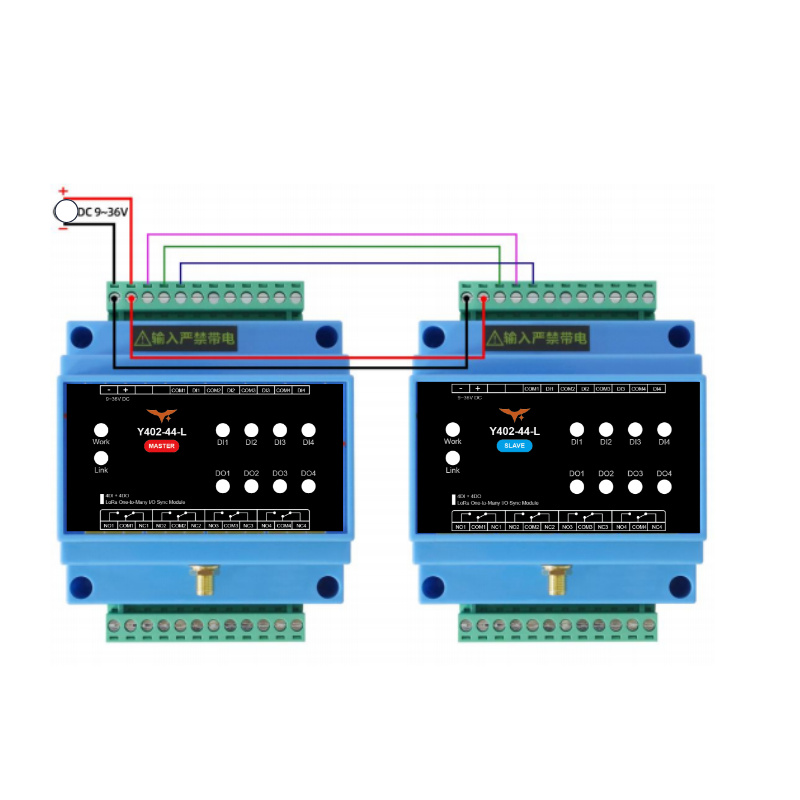
Step 1: Wire the devices
Connect 2 power lines and 3 communication lines between the new Slave and the Master (or any existing paired Slave).
Step 2: Power on
Apply 9–36V DC power to both devices. The power indicators on both devices should light up steadily.
Step 3: Wait for pairing
Within approximately 20 seconds, the connection indicators on both devices will light up steadily, indicating successful pairing.
Troubleshooting: If the connection indicators do not light up after 30 seconds, power off both devices, check all wiring connections, and power on again.
Step 4: Complete
Disconnect the communication lines. The new Slave is now part of your system and can communicate with the Master and all other paired Slaves.
5. Wiring Instructions
5.1 Input Connection (Switch/Sensor Side)
The Y402-44-L input terminals accept dry contact signals only (no voltage present). Choose the appropriate wiring method based on your signal type:
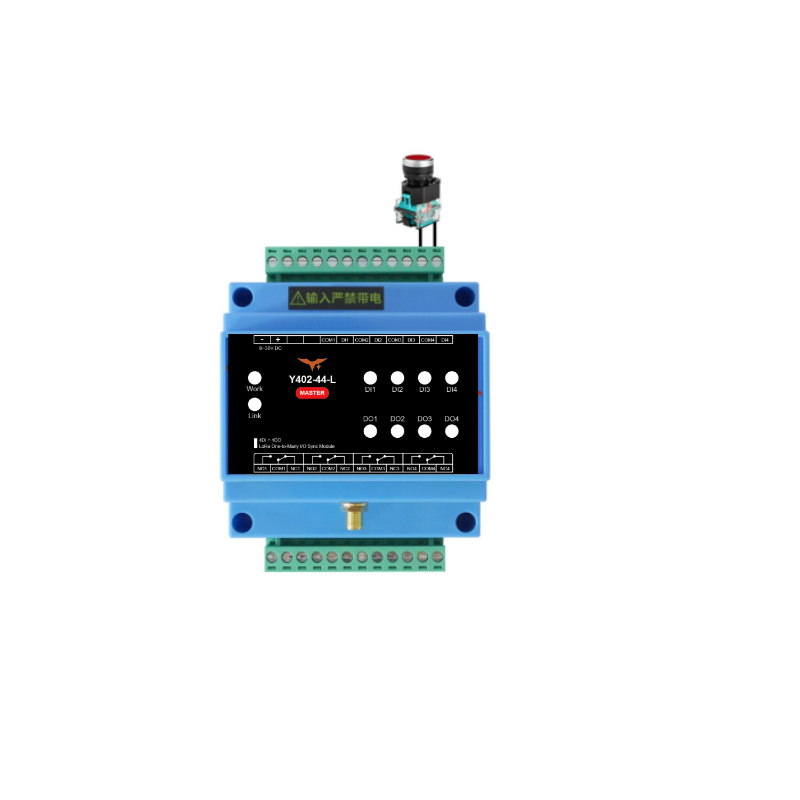
Method A: Mechanical Switches (Recommended)
Use this method for simple mechanical switches like push buttons, toggle switches, float switches, or relay contacts.
✓ Direct connection: Wire the switch between the input terminal and common terminal. No external power needed.
Method B: NPN Sensors
Use this method for NPN-type proximity sensors or photocells.
✓ Wiring: Connect sensor emitter to COM terminal, sensor collector to input terminal. Important: Do not connect NPN sensors to any external power source—they are powered internally by the Y402-44-L.
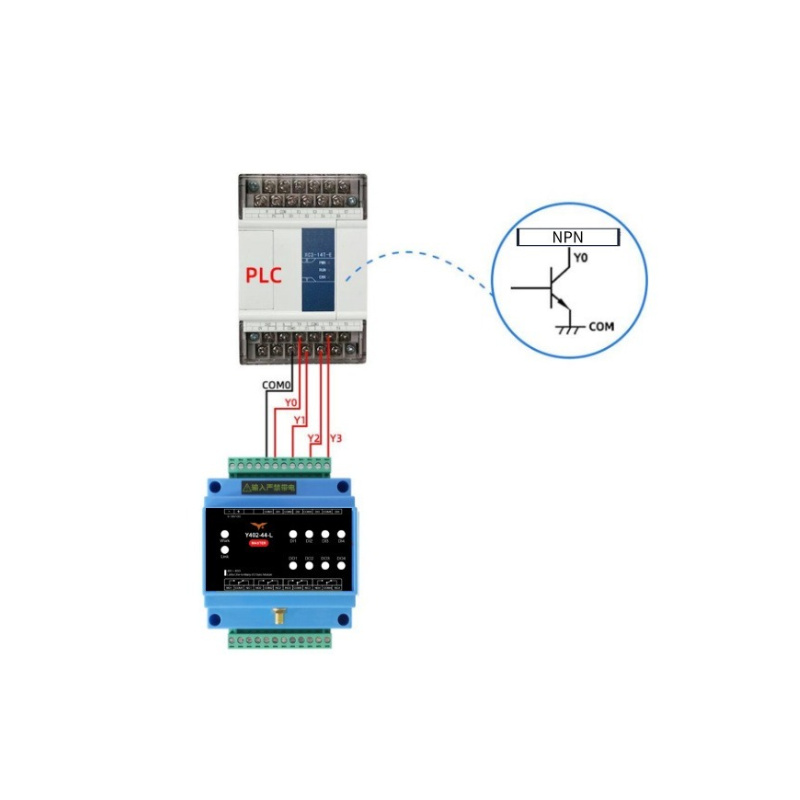
Method C: Active/Powered Signals (PLC, Controller Outputs)
Use this method when connecting to PLC outputs or other powered control signals.
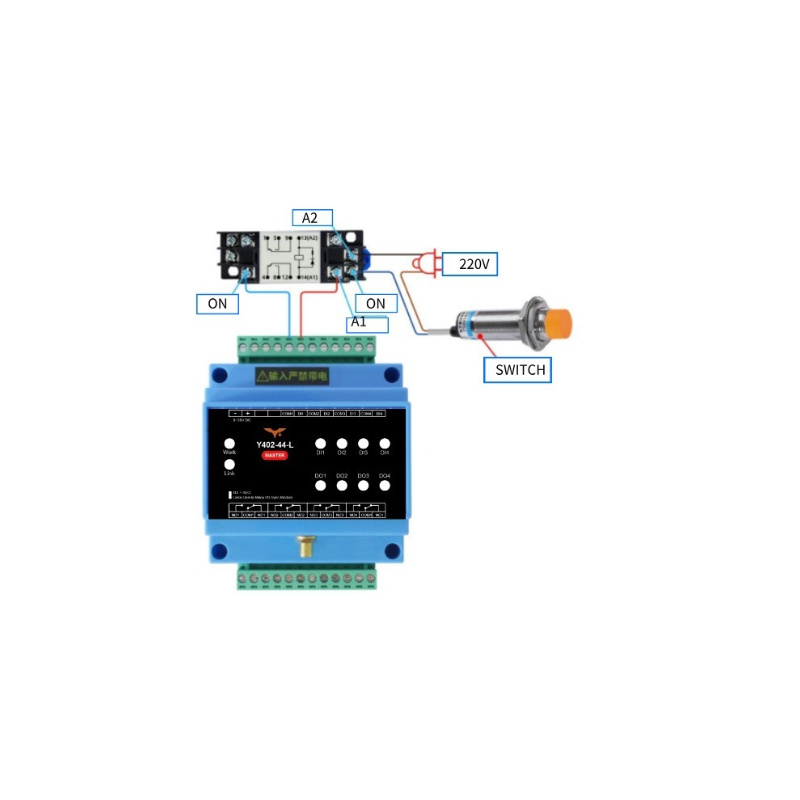
⚠️ Must convert first: Active signals cannot connect directly. Use an intermediate relay to convert the powered signal to a dry contact, then connect the relay contacts to the input terminals.
5.2 Output Connection (Load Side)
Each of the 4 channels can independently control a load. Choose the appropriate wiring method based on your load power:
Method A: Small Loads (≤ 1 kW)
For resistive loads up to 1 kW (lights, small heaters), connect directly to the relay output.
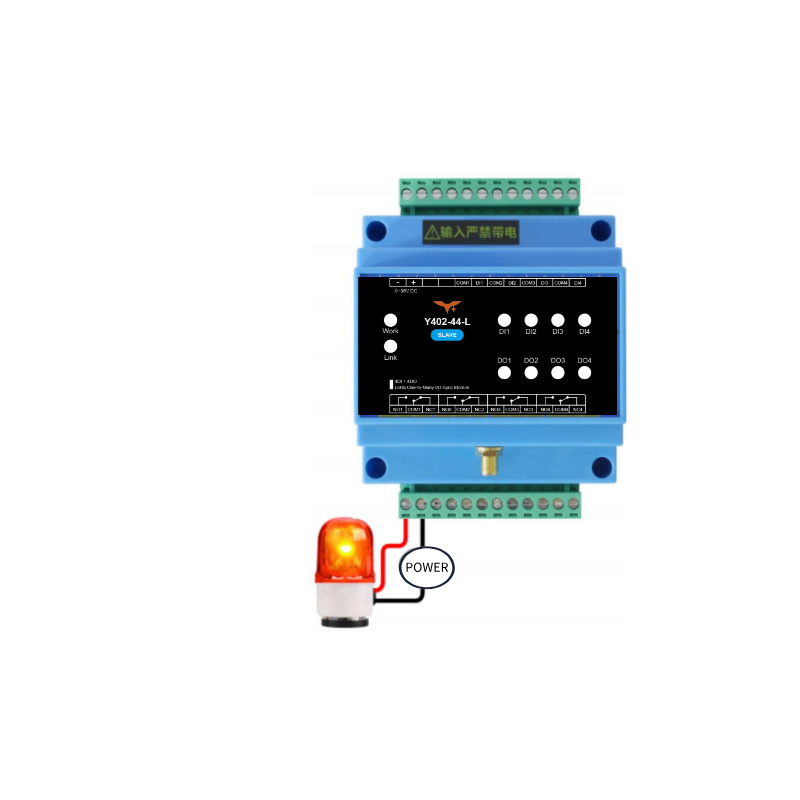
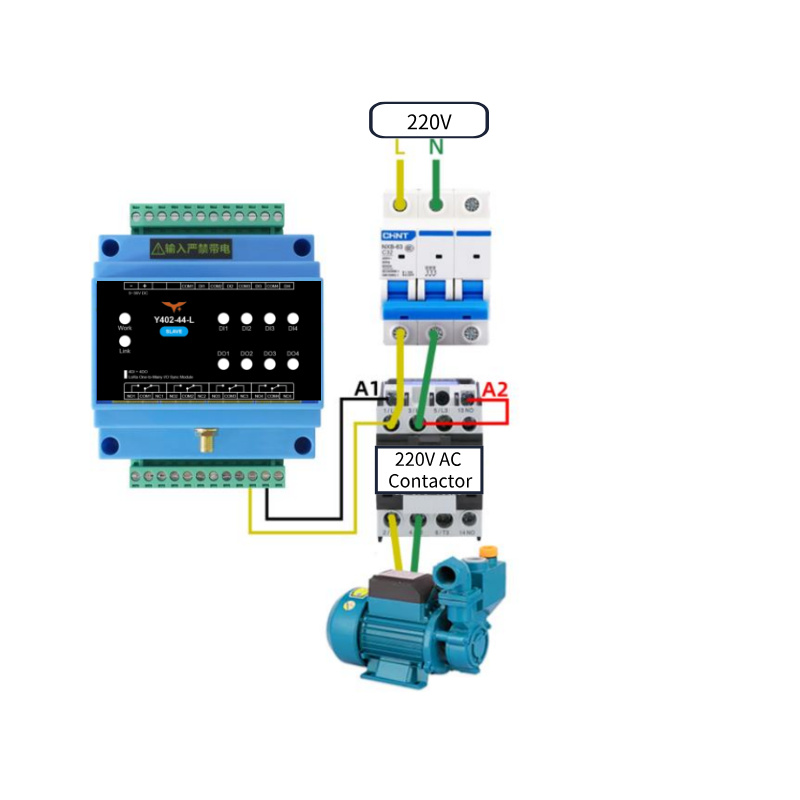
Method B: Large Loads (> 1 kW)
For high-power devices, use the Y402-44-L to control a contactor, which then switches the heavy load.
Example: Controlling a 3-phase motor or large heating element with a 220V AC contactor.
6. Important Usage Notes
Real-time Considerations
The Y402-44-L uses half-duplex wireless communication. Signal transmission time varies based on environmental conditions and distance. Not suitable for applications requiring precise real-time control, such as emergency stop circuits or high-speed machinery synchronization.
Antenna Installation
| Parameter | Requirement |
|---|---|
| Frequency | 398–525 MHz only |
| Mounting | Vertical orientation |
| Height | Approximately 2 meters above ground |
| Clearance | Keep away from large metal objects and structures |
| Connection | Ensure antenna connector is tightly screwed |
Tip: Proper antenna placement significantly improves communication range and reliability.
- Manufacturer: Hunan YenGear Tech Co.,Ltd
- Address: Room 21014, Unit 1, Fudixingguang plaza, Yuhua district Yingxin road, Changsha, Hunan, P.R. China
- Email: [email protected]
- Website: www.yengear.com