
Appearance
Y301 MiniLink Series Serial I/O Modules User Manual
Applicable models: Y301-110, Y301-200, Y301-020.
Product Overview
MiniLink modules acquire switch states and control relay contacts over Modbus RTU. The three models provide one or two digital I/O channels.
Key features:
- RS485 standard; RS232 and TTL available on selected models
- 5-36 VDC power supply
- Dry and wet contact DI support
- Relay outputs for valves, lights, alarms, and actuators
- DIN-rail or screw mounting
Model Naming

The positions after Y301- represent DI / DO / AI / AO channel counts on one module. 0 means no channels of that type. Models without AO use three characters for DI, DO, and AI; models with AO retain the fourth position.
| Code | Channel count |
|---|---|
0–9 | 0–9 |
A | 10 |
G | 16 |
W | 32 |
Interface options are specified separately from the I/O code; use the configuration table in the relevant specification.
For example, Y301-110 has 1 DI and 1 DO; Y301-200 has 2 DI only; Y301-020 has 2 DO only. All three models have no AI or AO.
Model Selection
| Product | Model | DI | DO | Recommended Use |
|---|---|---|---|---|
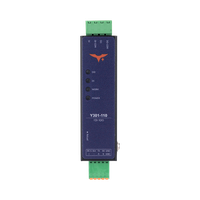 | Y301-110 | 1 | 1 | One switch input + one device control |
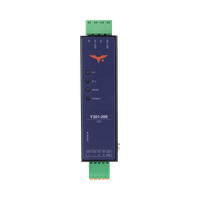 | Y301-200 | 2 | 0 | Two-channel status acquisition |
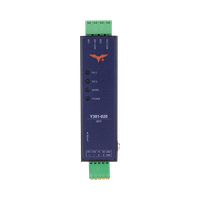 | Y301-020 | 0 | 2 | Two-channel relay control |
Default Parameters
| Parameter | Default Value |
|---|---|
| Communication protocol | Modbus RTU |
| Device address | 1 |
| Baud rate | 9600 bps |
| Data bits | 8 |
| Stop bits | 1 |
| Parity | None |
| Power supply | 5-36 VDC |
Note: Each RS485 device must have a unique address. Changes to address or baud rate require a restart. If communication fails, verify address, baud rate, A/B polarity, and GND connection.
Hardware Interfaces
| Interface Area | Y301-110 | Y301-200 | Y301-020 |
|---|---|---|---|
| Power | +, - | +, - | +, - |
| Communication | A, B, GND | A, B, GND | A, B, GND |
| DI Input | DI, DI-COM | DI1, DI1-COM, DI2, DI2-COM | None |
| DO Output | COM1, NO1, NC1 | None | COM1~COM2, NO1~NO2, NC1~NC2 |
| Reload Button | Reload / Reset | Reload / Reset | Reload / Reset |
DO terminal definitions:
COM: CommonNO: Normally open (closes when relay on)NC: Normally closed (opens when relay on)
Wiring precautions:
- Power off before wiring
- Use shielded twisted pair for RS485; add 120Ω termination at both ends of long runs
- Add flyback diodes, RC snubbers, or surge protection for inductive loads
- Relay rating: 125 VAC / 0.5 A or 30 VDC / 2 A
DI Wiring
Y301-110 has one input pair (DI, DI-COM). Y301-200 has separate input pairs (DI1, DI1-COM and DI2, DI2-COM). Use the labels on the supplied module.
Y301-200 Dry Contact Input
| Connection | DI1 | DI2 |
|---|---|---|
| Supply negative | DI1-COM | DI2-COM |
| Supply positive through the external contact | DI1 | DI2 |
Disconnect power before wiring. Each external contact switches the supply-positive connection to its DI terminal. Use the Y301-110 wiring drawing for its single input pair.
Wet Contact Input
Wire the signal positive to the selected DI and its negative reference to the corresponding DI-COM. The permitted wet-contact signal voltage is not specified in this manual; obtain the input limits for the supplied hardware before connecting an active source. The 5-36 VDC module supply range does not establish the DI signal range.
DO Wiring Diagram
Applicable models: Y301-110, Y301-020.
DO channels provide relay contact outputs for valves, lights, alarms, and small actuator circuits.
Standard Load
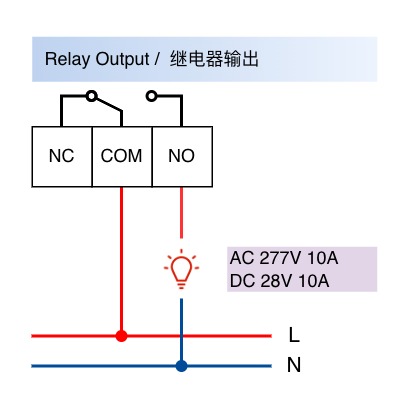
Wiring notes:
- Relay contacts do not output voltage; external load power is required
- Standard wiring: route load power line through COM and NO
- Use COM and NC for normally-on applications
- For AC high-voltage loads, use qualified personnel and proper insulation / fuses
Common Applications
| Application | Recommended Model | Description |
|---|---|---|
| Door sensor, button, or level switch monitoring | Y301-200 | Two digital inputs |
| Alarm light, buzzer, or valve control | Y301-020 | Two relay outputs |
| Equipment status and remote start/stop | Y301-110 | One input and one output |
- Manufacturer: Hunan YenGear Tech Co., Ltd.
- Email: [email protected]
- Website: www.yengear.com