
Appearance
Plans, quotas, and expiry
Plans apply to an organization. Its members share the project, device, point, and member allowances.
View your plan
A Manager or Owner can open Settings → Membership to review the current plan, validity period, usage, and available plans.
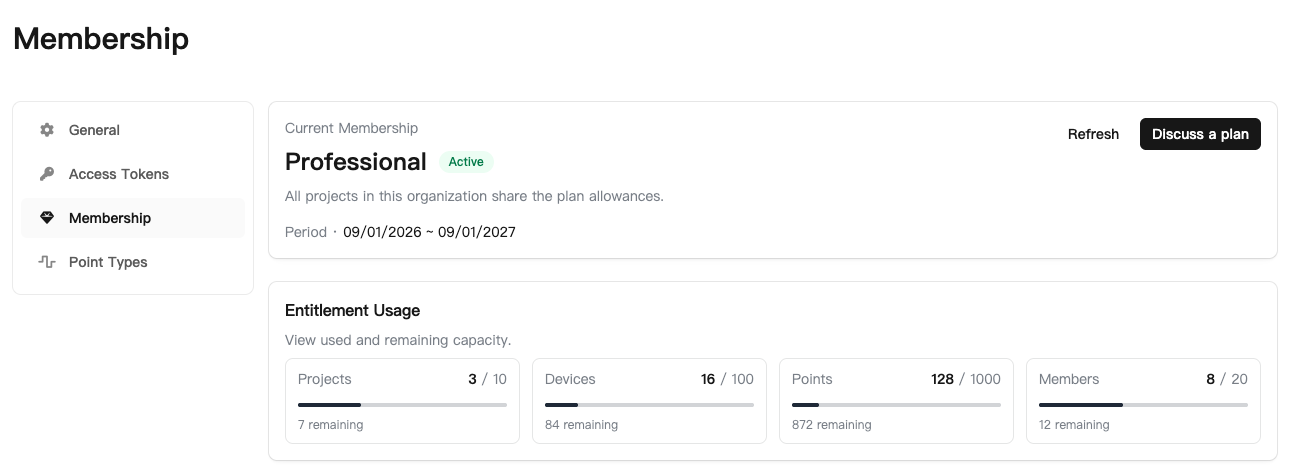
| Information | Meaning |
|---|---|
| Current plan and status | Whether service is active and the plan is valid |
| Service period | Start and end of the current plan period |
| Project, device, point, and member usage | Used, allowed, and remaining quantities |
| Available plans | Service scope, allowances, and prices offered on the page |
Use the current membership page or your quotation for prices, periods, and quotas. The plan values in a screenshot are examples for that organization.
Insufficient quota
The platform checks the relevant quota when you create projects, add devices or members, or add points. If the allowance is exhausted, review usage, remove resources you no longer need, or use the membership contact option to request a plan change.
Save needed configurations and records before deleting resources. Check that equipment is no longer in use before removing it to free quota.
Read-only mode
When the plan expires, ordinary configuration and control actions pause. Safety actions such as off and stop remain subject to the account's existing permissions; a Read-only role does not gain control access.
External email and SMS sending also pauses. Renewal does not resend messages from the paused period. After service is restored, check device status, automation, and notification settings, and use a test send to verify destinations where needed.