
Appearance
Modbus configuration reference
On devices that support Modbus point configuration, the slave ID, function code, and read address locate the data. Data format, byte order, index, scale, and offset determine how the response becomes a displayed value.
Add or edit a point in Points, then expand Modbus Read Configuration and Value decoding.
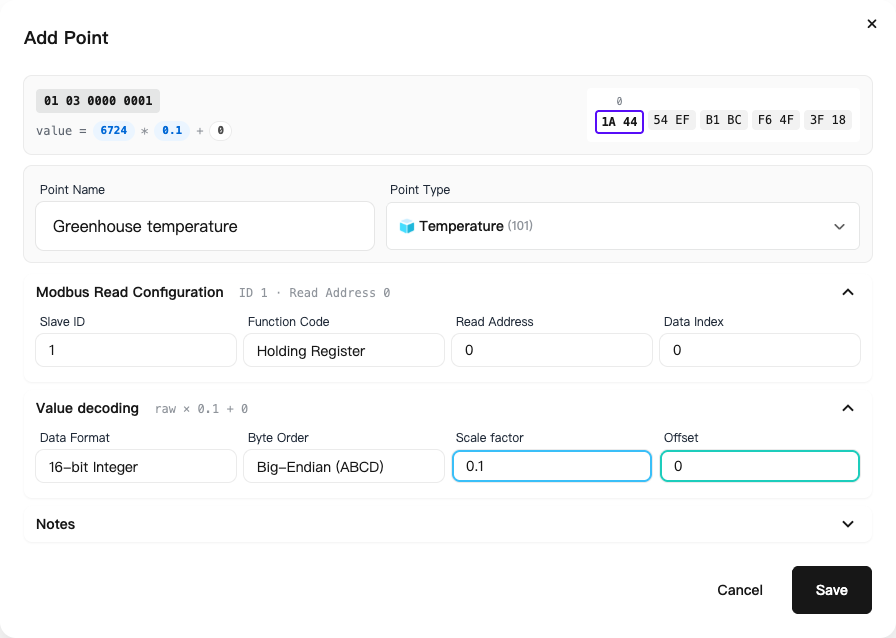
Slave ID
The slave ID identifies a device on the RS485 bus. Modbus RTU commonly uses addresses 1–247; give each slave on a bus a different address. Baud rate, data bits, parity, and stop bits must match the gateway. See Device settings.
Function code
| Read function | Code | Object |
|---|---|---|
| Coil | 01 | Coil state |
| Discrete input | 02 | Discrete input state |
| Holding register | 03 | Holding register |
| Input register | 04 | Input register |
Choose the code from the device's register map, rather than from the point name. Read function codes and write control commands serve different purposes.
Read address
The read address is the register start address in the protocol. Address 0x0000 is decimal 0. If the manual uses logical numbers such as 40001, check the manufacturer's numbering convention before entering a start address.
The point editor shows a request summary and decoding preview. Its simulated response bytes help check settings but are not a reading returned by the device.
Data index
The index starts at 0; the interface accepts 0–9. It selects a position within one read result. Register decoding uses register offsets, with 2 bytes per register.
For two adjacent 16-bit registers read from the same start address, use index 0 for the first and 1 for the second. A 32-bit value occupies two registers, so the next 32-bit value's start index must account for that width.
Data format and byte order
The format interprets the bytes as signed integers, unsigned integers, floating-point numbers, or another supported representation. Byte order controls their arrangement. Choose both from the register map and available interface options.
For incorrect negative temperatures, check signed versus unsigned format. For incorrect 32-bit values, also check register width, index, and byte arrangement. Repeatedly changing the scale cannot correct the wrong decoder.
Scale factor and offset
text
Displayed value = decoded value × scale factor + offset| Conversion | Decoded value | Scale factor | Offset | Displayed value |
|---|---|---|---|---|
| Raw value is 10 times the measurement | 253 | 0.1 | 0 | 25.3 |
| Multiply by 0.1, then subtract 40 | 652 | 0.1 | -40 | 25.2 |
Use the conversion specified by the target device. Thresholds check a range and do not change this calculation.
Troubleshoot readings
| Symptom | Check |
|---|---|
| No data | Power, wiring, serial parameters, slave ID, function code, address |
| Value is 10 or 100 times too large or small | Scale and unit |
| Consistent offset | Offset value |
| Very large values, wrong negative values, or jumps | Format, byte order, index, and register width |
Compare the result with the sensor display or a reference instrument before changing parameters. See the DTU tutorial for a worked example.