
Appearance
Y212-G / Y212-GWR Technical Manual
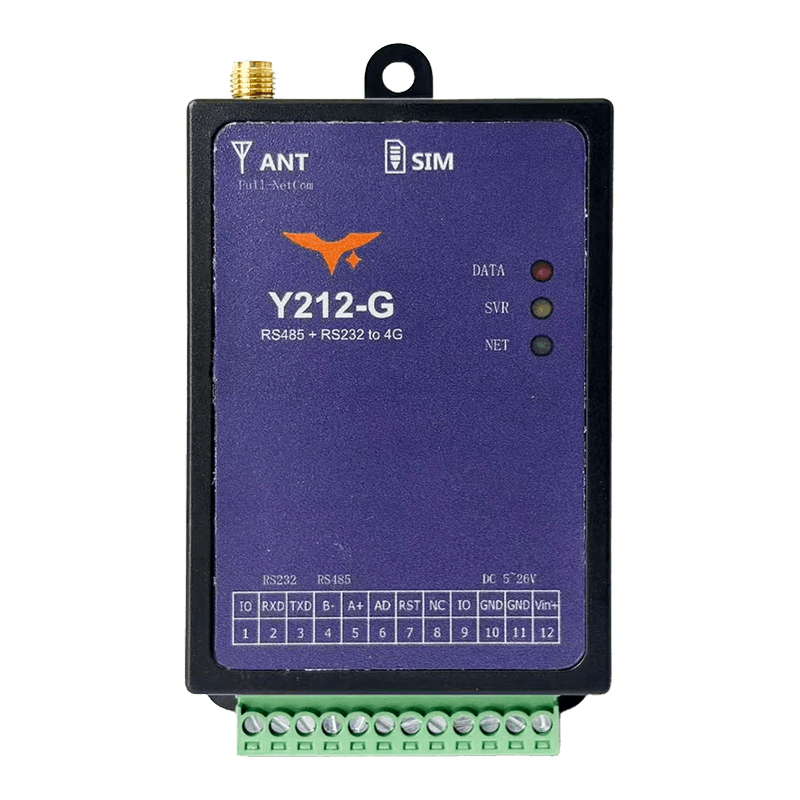 | 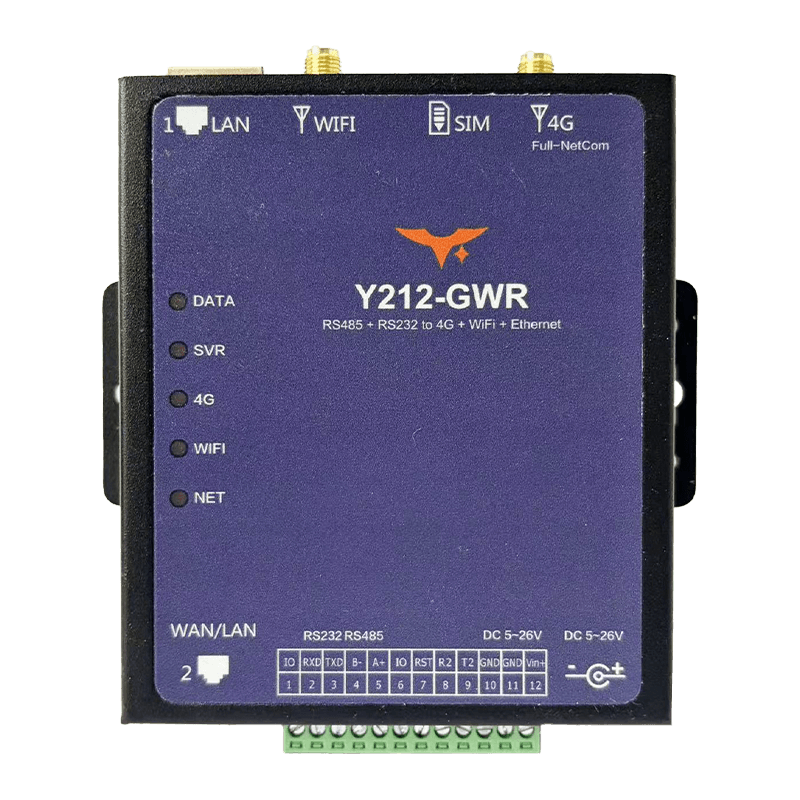 |
|---|
Contents
- Overview
- Default Settings
- AT Command Conventions
- Server Connection and Online Strategy
- Serial Transparent Transmission and Packetization
- Serial Parameters and Online Control
- I/O and Analog Functions
- Status Query and Maintenance
- GNSS / LBS Positioning, Optional
- Wi-Fi / RJ45 Router Extension, Y212-GWR Only
- Troubleshooting
1. Overview
This manual applies to the Y212-G 4G DTU and the Y212-GWR 4G plus Wi-Fi plus RJ45 industrial router. Both products use the same AT command system and can be configured directly through the serial port, SMS, or remote API, without a graphical configuration tool.
Unless otherwise noted, AT commands are shared by both models. Hardware-dependent baseline values in Sections 1 and 2 use the current Y212-G hardware reference; router-only features for Y212-GWR are listed separately in Section 10 and in the Y212-GWR specification.
| Model | Uplink | Physical Interfaces | Typical Application |
|---|---|---|---|
| Y212-G | Qualcomm Cat.4 multi-mode 4G | RS232, RS485, TTL secondary UART, 2 x IO, ADC | Transparent DTU transmission and remote sensor data collection |
| Y212-GWR | Qualcomm Cat.4 multi-mode 4G + Wi-Fi STA / AP + dual RJ45 | RS232, RS485, optional TTL secondary UART, dual RJ45, Wi-Fi, 2 x IO plus function pin IO3 | Wired / wireless multi-link backup, edge routing, remote maintenance |
Frame format: All serial commands use 9600-8-N-1 by default, plain ASCII text, and end with \r\n.
2. Default Settings
| Parameter | Default |
|---|---|
| Serial Baud Rate | 9600 bps |
| Data Bits / Parity / Stop Bits | 8 / None / 1 |
| 4G Mode | Y212-G reference: Qualcomm Cat.4 with 2G / 3G fallback |
| 4G Bands | Y212-G reference: GSM EGSM900/DCS1800; WCDMA B1/B8; CDMA2000 BC0; TD-SCDMA B34/B39; LTE-FDD B1/B3/B5/B8; LTE-TDD B34/B38/B39/B40/B41 |
| Power Input | Y212-G reference: 6 to 28 VDC, typical 12 V / 2 A |
| Heartbeat | 60 s, header $$$, AT*HBTIME=60, AT*HBHEAD=$$$ |
| Registration Packet | Enabled, format @@@ + DTUID, AT*REGPKG=1 |
| DTUID | Read from module IMEI by default |
3. AT Command Conventions
- Set command:
AT*CMD=param1,...,paramN\r\n, returnsOKon success andERRORon failure - Query command:
AT*CMD?\r\n, returns+CMD:...followed byOK - Multiple commands can be sent in one batch, but a single command must not be split
- Operations protected by the system password require
AT*SYSPWD=<curr_pwd>first
4. Server Connection and Online Strategy
4.1 Server Configuration, Required
| Command | Description | Example |
|---|---|---|
AT*SERVERn=protocol,ip,port | Configure server channel n, 0 to 5. Protocol 0=TCP, 1=UDP, 8=HTTP, 9=MQTT, 10=Alibaba IoT, 14=MQTTS, 19=WebSocket, and more | AT*SERVER0=9,47.94.253.148,1883 |
AT*SERVERn? | Query the selected server channel | AT*SERVER1? |
4.2 Online Mode, AT*GPRSMODE
| Value | Mode | Description |
|---|---|---|
0 | Offline | No automatic connection |
1 | Always online, default | Auto reconnect on disconnect, heartbeat keepalive |
2 | Wake-up online | Goes online after a wake-up command or SMS and disconnects after idle timeout |
3 | On-demand online | Goes online when serial data arrives and disconnects after idle timeout |
4 | Scheduled online | Goes online periodically according to AT*SCHTIME |
4.3 Multi-Center Connection, AT*CHMODE
0: Primary center only1: Primary / backup switchover, default2: Primary and backup connected at the same time, dual send3: Independent primary and backup channels, useSNDPORTnandRCVPORTnto distinguish them
4.4 Access Point Name, APN
Use AT*APN=apn,username,password. For standard IoT SIM cards in China, cmnet or cmiot may be used. Private SIM cards should follow carrier requirements.
4.5 Heartbeat and Registration Packet
| Command | Function | Notes |
|---|---|---|
AT*HBHEAD=<pattern> | Set heartbeat header, supports HEX, NID, FIX, and wildcards such as {DTUID} or {IMEI} | |
AT*HBTIME=<seconds> | Heartbeat interval, 0 to 3600 s, 0 disables it | |
AT*REGHEAD=<text> | Registration packet header, often used for backend identification | |
AT*REGPKG=<mode> | 0=off, 1=header+DTUID, default, 2=header only, 3=hex, 5=send registration packet to MQTT as well |
5. Serial Transparent Transmission and Packetization
| Function | Command | Description |
|---|---|---|
| Inter-frame interval | AT*DFI=<10~5000> | Maximum inter-frame interval; when exceeded, the current frame is sent |
| Fixed frame length | AT*DFLEN=<n> | Send when received serial data reaches n bytes |
| Data mode | AT*DATAMD=<0~3> | 0=stream, 1=frame, 2=JSON packet, 3=custom |
| Append ID | AT*DATAID=<0~4> | Controls whether DTUID or time is attached to the report |
| HEX / string conversion | AT*HEX2STR, AT*STR2HEX | 0=off, 1=on |
| Header filter | AT*DATAFLAG=... | Transparently forwards only data matching specific headers; supports multiple headers with & |
| Data compare | AT*CMPDATA=<0~2> | 1=drop duplicates, 2=polling comparison |
| Receive window | AT*RXDTIME=schedule,time_long | Periodically opens a receive window to reduce traffic |
| Hourly traffic limit | AT*URFC=<KB> | 0 to 1000 KB/h |
| Buffer policy | AT*BUFMODE=<0~2> | Controls offline buffer retention policy |
| Buffer query | AT*BUFLEN?, AT*BUFCLN | Check or clear the buffer |
6. Serial Parameters and Online Control
| Command | Function |
|---|---|
AT*UART=baud,dataBits,parity,stopBits | Set main serial port; use AT*UARTB for the secondary UART |
AT*WAKEUP | Trigger online state in wake-up mode |
AT*OFFLINE | Manually disconnect in on-demand or wake-up mode |
AT*IDLTIME=<5~3600> | Auto-disconnect timeout with no data, valid for modes 2 / 3 / 4 |
AT*SCHTIME=<minutes> | Online interval for scheduled mode |
7. I/O and Analog Functions
| Function | Command | Description |
|---|---|---|
| GPO output | AT*GPO=no,mode | mode: 0=low, 1=high, 3/4=pulse, 5 to 8=indicator functions |
| GPI input | AT*GPI=mode,schedule,en1,en2 | 1=periodic report, 2=change report; use AT*GPI# to query state |
| ADC sampling | AT*ADC? | Returns millivolt value, 0 to 8000 mV, depending on model |
8. Status Query and Maintenance
| Command | Description |
|---|---|
AT*VERSION? | Returns hardware and software version |
AT*LIST? | Lists all current settings |
AT*CSQ? | Queries cellular or Wi-Fi signal strength |
AT*GSTATE? | Checks online state for each center channel |
AT*DSTATE? | Checks runtime state such as no SIM, not registered, or low signal |
AT*DTUIP? | Queries the current dial-up IP |
AT*REG? | Returns registration status, LAC, and Cell ID |
AT*ICCID?, AT*IMEI? | Query SIM and device identifiers |
AT*TIME?, AT*UTC? | Query local and UTC time |
AT*SYSPWD=curr,new | Change system password, 6 digits |
AT*RESET=<pwd> | Restore default parameters and reboot |
AT*RESTART | Soft reboot |
9. GNSS / LBS Positioning, Optional
| Command | Description |
|---|---|
AT*GPSCFG=mode,period,lbs_enable | 0=off, 1=server only, 2=serial only, 3=both, 4=on demand; period in seconds; lbs_enable=1 enables hybrid positioning |
AT*GPSINFO=<n> | 0=GPRMC, 1=GPGGA, 2=both |
AT*GMODE=<n> | 0=multi-constellation, 1=GPS, 2=BeiDou |
AT*GPSID=<0/1> | Controls whether DTUID is added to the location message |
AT*GPSINFO? | Returns the latest NMEA or LBRMC message |
AT*GSQ? | Queries satellite count |
AT*LBS? | Queries base-station positioning only |
| Modbus Read | Use 50 03 00 3D 00 04 D8 44 to read longitude and latitude as big-endian float values |
GNSS messages update every
5 sby default. Whensend_period=0, the device reports once after the first position fix and then stops automatically.
10. Wi-Fi / RJ45 Router Extension, Y212-GWR Only
| Function | Command | Description |
|---|---|---|
| Router / bridge mode | AT*RMODE=<0/1> | 0=router, default; 1=bridge |
| Network environment | AT*RNWK=<0/1/2> | 0=local only, 1=LAN, 2=public, default |
| Wi-Fi STA / AP | AT*WSET=ssid,password,mode | mode=0 STA, 1 AP; AT*WSET1/2 configures backup SSIDs |
| Current uplink | AT*CNWK? | Returns 0=offline, 1=WAN, 2=Wi-Fi, 3=4G |
| Client list | AT*CLIST? | Lists connected clients |
| Hotspot scan | AT*WSCAN? | Returns available SSIDs |
| Port 2 mode | AT*WLAN=<0/1> | 0=LAN, 1=WAN, default |
| LAN subnet | AT*LANIP=ip | Sets the internal gateway, default 192.168.77.1 |
| WAN static IP | AT*WANIP=ip,mask[,gw] or DHCP | Used for switch or fixed public network access |
| Wi-Fi STA static IP | AT*WIFIIP=ip,mask,gw or DHCP | |
| MAC query | AT*WMAC? for WAN, AT*WFMAC? for Wi-Fi, AT*LMAC? for LAN | |
| Port forwarding | AT*DNAT=index,sock_type,src_port,dest_ip,dest_port | sock_type=tcp / udp / none |
On the current Y212-GWR hardware, port 1 is fixed as LAN and only port 2 is switchable between WAN and LAN. Reconnect the terminal after a subnet change. In AP mode, the password must be at least
8characters long.
11. Troubleshooting
| Symptom | Possible Cause | Suggested Command or Action |
|---|---|---|
| Cannot go online | Wrong server address or port, APN not configured, SIM not activated | AT*SERVERn?, AT*APN?, AT*REG?, AT*CSQ? |
| Serial port does not respond | Baud rate mismatch or system password not verified | AT*UART?, then send AT*SYSPWD=<pwd> before configuration |
| Data frames are malformed | Inter-frame interval or frame length not configured properly | Adjust AT*DFI, AT*DFLEN, and AT*DATAMD |
| Heartbeat or registration packet is not recognized by the cloud | Header format does not match | Check AT*HBHEAD, AT*REGHEAD, and AT*REGPKG |
| GNSS cannot get a fix | Antenna blocked or GNSS not enabled | Confirm AT*GPSCFG and check whether AT*GPSINFO? returns status V |
| Wi-Fi cannot connect, GWR only | Wrong mode or password, or subnet conflict | AT*WSET?, AT*LANIP?, AT*CNWK? |
LED reference, Y212-GWR
| LED | Status | Meaning |
|---|---|---|
| DATA | Blinking | Serial data activity |
| Server | On | Connected to center server |
| 4G | On / 1 s blink | Online / searching |
| Wi-Fi | On in STA / 1 s on, 2 s off in AP | Connection status |
| Network | Blinking | WAN active; blinking together with 4G or Wi-Fi means the device is searching |