
Appearance
Y502-L LoRaWAN Serial DTU Specification
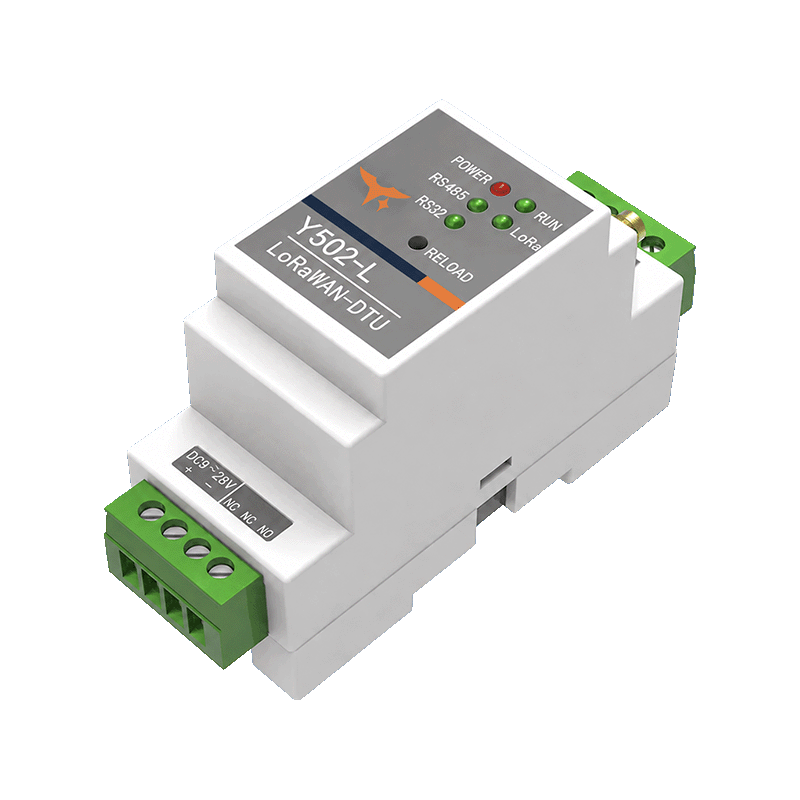
User Manual: Y502-L User Manual
Product type: Industrial LoRaWAN data transmission unit (DTU)
Contents
- Overview
- Model Configuration
- Key Features
- Technical Specifications
- Interfaces and Indicators
- Mechanical, Environmental, and Package
- Gateway Compatibility and Deployment
- Ordering Notes
1. Overview
Y502-L is an industrial LoRaWAN serial DTU for connecting PLCs, meters, data loggers, and serial sensors to a LoRaWAN network. It provides one isolated RS485 interface and one isolated RS232 interface for wireless data collection, remote reporting, and downlink control.
Y502-L supports transparent serial transmission, scheduled active acquisition, data-change reporting, and remote commands. It can send Modbus RTU requests and carry custom serial frames. Polling commands can be entered as ASCII text or hexadecimal bytes. The product has no DI, DO, AI, or AO channels; applications that require direct signal I/O use an appropriate I/O RTU instead.
The DTU connects to a Y501-L or Y511-L gateway through LoRaWAN. The gateway and the DTU must use the same regional frequency plan and compatible LoRaWAN settings.
| Item | Specification |
|---|---|
| Product type | Industrial LoRaWAN serial DTU |
| Serial interfaces | 1 isolated RS485 + 1 isolated RS232 |
| Direct I/O | None |
| LoRaWAN activation | OTAA / ABP |
| Device classes | Class A / Class C |
| LoRaWAN version | 1.0.3 |
| Reference deployment plan | CN470 |
| Supported regional plans | CN470, EU433, EU868, AU915, IN865, AS923, RU864, US915 |
| Gateway compatibility | Y501-L and Y511-L with a matching regional plan |
2. Model Configuration
2.1 Model Code
Y502-L identifies the YenGear LoRaWAN serial DTU family. The L suffix identifies the LoRaWAN communication variant.
| Model | RS485 | RS232 | DI | DO | AI | AO |
|---|---|---|---|---|---|---|
| Y502-L | 1 | 1 | 0 | 0 | 0 | 0 |
Y502-L is a serial communication product. Its field device capability is defined by the connected RS485 or RS232 equipment and its protocol configuration.
2.2 Product Positioning
| Product | Primary function | Direct signal channels |
|---|---|---|
| Y502-L | Wireless connection for serial equipment | None |
| Y503-2220-L | Distributed signal acquisition and remote control | 2 DI + 2 DO + 2 AI |
Use Y502-L for existing serial devices. Use Y503-2220-L when the application must connect directly to digital or analog field signals.
3. Key Features
- Converts RS485 and RS232 serial data to LoRaWAN uplinks and downlinks.
- Supports transparent serial transmission through a LoRaWAN network.
- Supports scheduled active polling with configurable read commands and acquisition intervals.
- Supports data-change reporting by comparing adjacent acquisition results.
- Sends Modbus RTU or custom serial commands entered as ASCII text or hexadecimal bytes.
- Supports remote parameter settings, read commands, and control commands.
- Supports a heartbeat task with a configurable reporting interval and configurable script uplink ports.
- Supports local serial configuration and approved remote configuration.
- Provides 35 mm DIN-rail mounting for cabinet and control-panel installations.
4. Technical Specifications
4.1 LoRaWAN Radio
| Parameter | Specification |
|---|---|
| Wireless protocol | LoRaWAN |
| LoRaWAN version | 1.0.3 |
| Activation | OTAA / ABP |
| Device classes | Class A / Class C |
| Frequency plans | CN470, EU433, EU868, AU915, IN865, AS923, RU864, US915 |
| Transmit power | -1 to 22 dBm, configurable |
| Maximum RF input level | <10 dBm |
| Bandwidth | Fixed 125 kHz |
| Spreading factor | SF7 to SF12, configurable |
| Nominal data rates | Approximately 5.5, 3.1, 1.8, 1.0, 0.6, and 0.3 kbps |
| Receiver sensitivity | -135 dBm @ SF12, BW125 kHz |
| Harmonics | < -40 dBm @ 1 GHz |
The actual channel group and transmit power must comply with the ordered regional variant and local radio regulations. Application throughput varies with the spreading factor, payload size, reporting interval, acknowledgements, and regional radio limits.
4.2 RS232
| Parameter | Specification |
|---|---|
| Interface | Isolated 3-wire RS232: TXD, RXD, GND |
| ESD protection | 15 kV |
| Data bits | 8 |
| Stop bits | 1 or 2 |
| Parity | None, odd, or even |
| Baud rates | 2400, 4800, 9600, 19200, 38400, 57600, or 115200 bps |
| Factory communication default | 115200 bps, 8 data bits, 1 stop bit, no parity |
4.3 RS485
| Parameter | Specification |
|---|---|
| Interface | Isolated RS485: A+, B- |
| ESD protection | 15 kV |
| Data bits | 8 |
| Stop bits | 1 or 2 |
| Parity | None, odd, or even |
| Baud rates | 2400, 4800, 9600, 19200, 38400, 57600, or 115200 bps |
| Factory communication default | 9600 bps, 8 data bits, 1 stop bit, no parity |
Configure the DTU and the connected field device with matching serial parameters. The serial protocol, device address, polling interval, and payload mapping are defined by the connected equipment and the commissioned application.
4.4 Electrical
| Parameter | Specification |
|---|---|
| Supply voltage | DC 9-28 V |
| Recommended supply | DC 12 V / 1 A |
| Maximum current | 0.5 A at DC 12 V supply |
| Average power consumption | ≤0.5 W in low-duty-cycle operation |
4.5 Configuration and Data Acquisition
| Parameter | Specification |
|---|---|
| Operation modes | Transparent transmission and active acquisition |
| Acquisition tasks | Up to 16 configurable scripts, plus a heartbeat task |
| Command entry formats | HEX or ASCII |
| Maximum script length | 40 bytes |
| Script interval | 10-86,400 s |
| Remote functions | Parameter settings, read commands, control commands, and approved configuration commands |
The script and payload behavior are defined by the delivered firmware and project configuration. Record the final commands, intervals, port mapping, and decoding rules in the commissioning record.
5. Interfaces and Indicators
5.1 Interface Description
| Interface | Description |
|---|---|
| Power input | DC 9-28 V |
| Factory reset button | Short press: reset; double-click: enter configuration mode; hold for 5 s: restore factory settings |
| LoRa antenna | SMA female connector |
| RS485 | A+, B- |
| RS232 | TXD, RXD, GND |
5.2 LED Indicators
| Indicator | Function |
|---|---|
| POWER | On when power is normal; off when power is absent or abnormal |
| RUN | Blinks during normal operation; steady or off when the system is abnormal |
| LoRa TX | Briefly lights or blinks during LoRa transmission |
| RS232 RX | Blinks when RS232 data is received |
| RS485 RX | Blinks when RS485 data is received |
6. Mechanical, Environmental, and Package
6.1 Mechanical and Environmental
| Parameter | Specification |
|---|---|
| Mounting | 35 mm DIN rail |
| Dimensions | 87.65 × 36.54 × 59.3 mm |
| Weight | Approximately 0.5 kg |
| Operating temperature | -40 to 85 °C |
| Storage temperature | -50 to 95 °C |
| Humidity | 0-95% RH, non-condensing |
6.2 Standard Package
| Item | Quantity |
|---|---|
| Y502-L DTU | 1 |
| DC 12 V / 1 A power adapter | 1 |
| LoRa antenna | 1 |
The delivered accessories vary by order configuration. Check the packing list before installation.
7. Gateway Compatibility and Deployment
7.1 Recommended Network Topology
Serial field device → Y502-L → LoRaWAN → Y501-L or Y511-L → Network Server or local service → Application
Transparent mode carries serial bytes in LoRaWAN packets. Payload limits, airtime, and downlink scheduling constrain it; confirm packet length and timeout settings before using request/response equipment.
Y502-L uses standard LoRaWAN networking. It can work with a Y501-L or Y511-L gateway when the gateway, Network Server, and DTU use compatible regional plans, channel groups, activation settings, and payload definitions.
7.2 Regional Plan Matching
The current Y502-L release uses the following regional plan set:
CN470— reference deployment planEU433EU868AU915IN865AS923RU864US915
The gateway frequency options do not by themselves establish the ordered DTU variant. Confirm the regional plan for both the gateway and Y502-L before delivery.
7.3 Data and Control Direction
| Direction | Typical data |
|---|---|
| Uplink | Serial data, heartbeat, device status, and acquisition results |
| Downlink | Serial commands, read commands, control commands, and approved configuration commands |
The exact payload format, port number, scaling, and acknowledgement behavior are defined by the delivered firmware and project configuration.
8. Ordering Notes
- Specify the regional frequency plan when ordering.
CN470is the reference deployment plan. - Confirm that the gateway and Network Server use the same regional plan and channel group.
- Confirm whether the application requires Class A or Class C operation.
- Confirm the connected device interface: RS485 or RS232.
- Confirm the serial protocol, baud rate, device address, register map, polling interval, and payload format before deployment.
- Y502-L has no DI, DO, AI, or AO channels. Select Y503-2220-L when direct I/O acquisition or control is required.
- Use only a firmware package and configuration profile approved for the exact Y502-L hardware variant.
YenGear
Hunan YenGear Tech Co., Ltd.
Room 21014, Building 1, Fudi Xingguang Tiandi, Yingxin Road, Yuhua District, Changsha, Hunan, China
[email protected] · www.yengear.com