
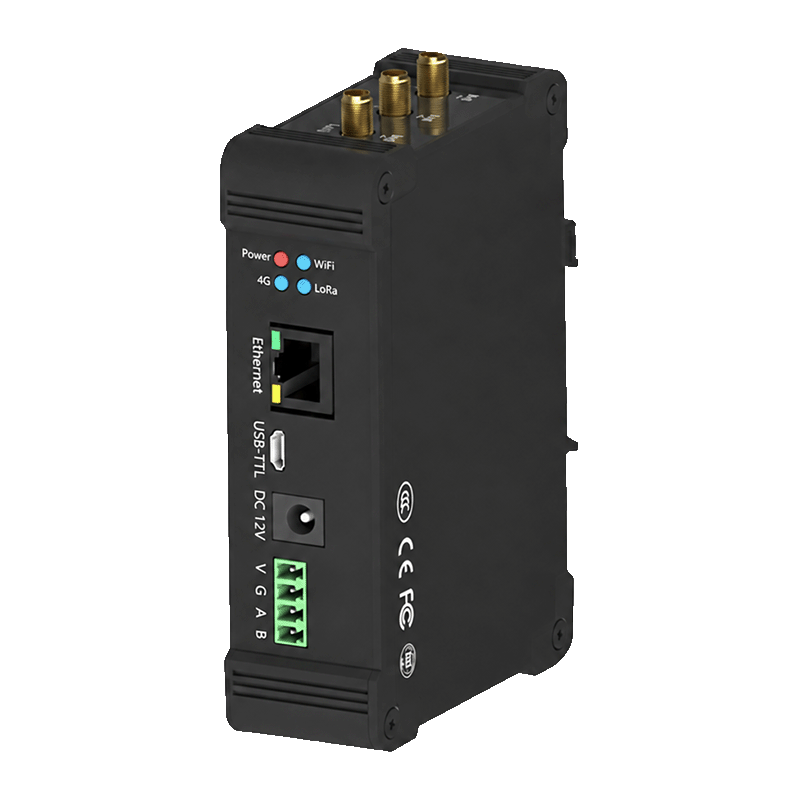
Appearance
Y501-L LoRaWAN Indoor Gateway Specification
User Manual: Y501-L User Manual
Contents
- Overview
- Model Configurations
- Key Features
- Technical Specifications
- Interfaces and Indicators
- Mechanical and Environmental
- Ordering and Deployment Notes
1. Overview
Y501-L is an indoor LoRaWAN gateway for receiving LoRaWAN end-device traffic and forwarding it to an external Network Server. Ethernet, Wi-Fi, and RS485 are standard interfaces; 4G is available as an option. An ordered local NS/AS software option can handle device sessions and application data on the gateway.
Use the 8-channel or 16-channel configuration according to the expected radio traffic at the site.
| Item | Description |
|---|---|
| Product type | Indoor LoRaWAN gateway |
| Supported end-device LoRaWAN versions | LoRaWAN 1.0.2 / 1.0.3 / 1.0.4 |
| Supported end-device classes | Class A / Class C |
| Default frequency plan | CN470 |
| Supported frequency plans | CN470, EU433, EU868, AU915, IN865, AS923, RU864, US915 |
| Backhaul | 10/100 Ethernet and Wi-Fi; optional 4G |
| Operating environment | Indoor |
2. Model Configurations
| Configuration | Receive channels | Downlink channels | Selection profile |
|---|---|---|---|
| Y501-L, 8-channel | 8 | 1 | Lower concurrent radio traffic |
| Y501-L, 16-channel | 16 | 2 | More receive channels; two transmit paths |
The channel count describes radio paths, not the maximum number of end devices. Capacity depends on airtime, reporting intervals, payload size, interference, and downlink traffic. Two transmit paths do not guarantee twice the downlink capacity; regional limits, duplex mode, and server scheduling still apply.
3. Key Features
- Supports LoRaWAN 1.0.2, 1.0.3, and 1.0.4.
- Supports Class A and Class C end devices.
- Supports half-duplex or full-duplex operation according to the ordered configuration.
- Provides 8 or 16 LoRa receive channels and 1 or 2 downlink channels.
- Provides up to
27 dBmtransmit power and receiver sensitivity down to-140 dBm @ SF12, BW125 kHz. - Supports packet forwarding through UDP/GWMP or MQTT, according to the deployment mode.
- Supports local Web configuration, local upgrade, and remote configuration or upgrade where enabled.
- Supports Ethernet, Wi-Fi, and RS485 as standard interfaces; 4G is optional.
- Supports an optional local NS/AS configuration when included in the ordered product variant.
The Network Server manages end-device activation and sessions. In forwarding mode, the gateway transports radio packets; local NS/AS functions require the corresponding software configuration. NS means Network Server; AS means Application Server.
4. Technical Specifications
4.1 LoRaWAN Radio
| Parameter | Specification |
|---|---|
| Frequency plans | CN470 (default), EU433, EU868, AU915, IN865, AS923, RU864, US915 |
| Supported end-device LoRaWAN versions | 1.0.2 / 1.0.3 / 1.0.4 |
| Supported end-device classes | Class A / Class C |
| Channel configurations | 8 RX / 1 TX or 16 RX / 2 TX |
| Transmit power | Up to 27 dBm |
| Receiver sensitivity | Down to -140 dBm @ SF12, BW125 kHz |
| Radio hardware bandwidth range | 7.8 to 500 kHz; usable LoRaWAN settings depend on the regional plan |
| Spreading factor | SF7 to SF12 |
| Reference range | Up to 12 km line of sight and up to 5 km in urban environments; actual range varies with antennas, interference, installation, and site conditions |
4.2 Network and Field Interfaces
| Interface or function | Specification |
|---|---|
| Ethernet | 10/100 Mbps RJ45 |
| 4G | Optional; module and operator-band coverage vary by ordered variant |
| Wi-Fi | 2.4 GHz Wi-Fi; AP, STA, or AP+STA modes according to the ordered variant |
| RS485 | Standard A/B hardware; Modbus RTU data access requires the local-service software configuration |
| USB | MicroUSB USB-TTL debug and log interface |
| SIM card | Standard SIM card on 4G configurations |
| Configuration | Local Web interface; local and remote configuration where enabled |
4.3 Electrical
| Parameter | 8-channel configuration | 16-channel configuration |
|---|---|---|
| Supply | DC 9 to 28 V, typical DC 12 V | DC 9 to 28 V, typical DC 12 V |
| Maximum working current | 850 mA @ DC12V | 1.5 A @ DC12V |
| Average power | ≤3 W | ≤7 W |
| Maximum power | 10.2 W @ DC12V | 18 W |
5. Interfaces and Indicators
5.1 Main Interfaces
The connector arrangement varies by ordered channel and backhaul configuration. The product includes:
| Interface | Function |
|---|---|
| DC power input | DC 9–28 V; 5.5 × 2.1 mm jack and parallel power terminals |
| Enclosure ground | Protective earth connection |
| Ethernet | Network backhaul and local management |
| LoRa antenna connector | LoRaWAN radio antenna |
| Wi-Fi antenna connector | Wi-Fi antenna |
| 4G antenna connector | Optional cellular antenna |
| RS485 A/B | Local-service data access when included in the software configuration |
| SIM card slot | Optional cellular connection |
| Factory reset | Restores the configured factory settings |
5.2 Indicators
| Indicator | Meaning |
|---|---|
| Power | Power status |
| Wi-Fi | Blinking: starting; steady: started; off: not started or failed |
| 4G | Cellular network search, standby, and data status on 4G variants |
| LoRa | Steady: radio started; off: not started or failed. This does not confirm server connectivity. |
6. Mechanical and Environmental
| Parameter | 8-channel configuration | 16-channel configuration |
|---|---|---|
| Dimensions | 120.4 × 79.7 × 34 mm | 125.5 × 120.4 × 34 mm |
| Weight | Approximately 1 kg | Approximately 1.5 kg |
| Operating temperature | -20 to 70 °C | -20 to 70 °C |
| Storage temperature | -40 to 85 °C | -40 to 85 °C |
| Humidity | 0 to 95% RH, non-condensing | 0 to 95% RH, non-condensing |
| Installation | DIN rail or wall mounting, according to the supplied bracket | DIN rail or wall mounting, according to the supplied bracket |
7. Ordering and Deployment Notes
- Select the RF frequency plan, channel configuration, and half- or full-duplex hardware when ordering. The default plan is
CN470. ForAS923, specify the sub-plan. - Match the gateway frequency plan and channel group with the end devices and the Network Server.
- Select the 4G option when the deployment needs cellular backhaul.
- Confirm local NS/AS and RS485 data-service support before delivery. For Modbus access, confirm the gateway role and register map.
- Use a suitable external LoRa antenna and install it before powering the gateway.
- Connector set, cellular module, antenna count, and software options vary by ordered configuration.
YenGear
Hunan YenGear Tech Co., Ltd.
Room 21014, Building 1, Fudi Xingguang Tiandi, Yingxin Road, Yuhua District, Changsha, Hunan, China
[email protected] · www.yengear.com