
Appearance
Y301 FlexPoint DI Modules User Manual
Applicable models: Y301-600, Y301-800, Y301-G00.
These modules acquire 6, 8, or 16 digital inputs over the ordered serial interface.
Before Wiring
Power off the module and field circuit. The diagrams show one channel and the electrical connections, not connector pin order. Use the labels and fitted channels on the supplied module.
Wire colours: positive (+) red, negative (-) black, RS485 A yellow, and RS485 B green. Identify each connection by its terminal label.
DC Power
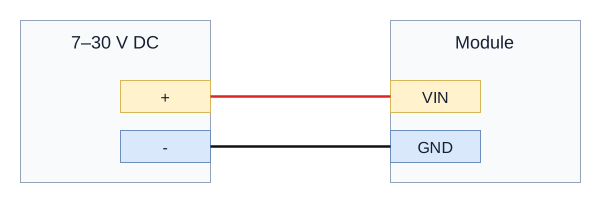
The module supply is 7-30 VDC, connected to VIN and GND. The DI active signal / excitation range is 3.3-24 VDC. A 30 V module supply must not be applied directly across a DI input.
Dry Contact Input
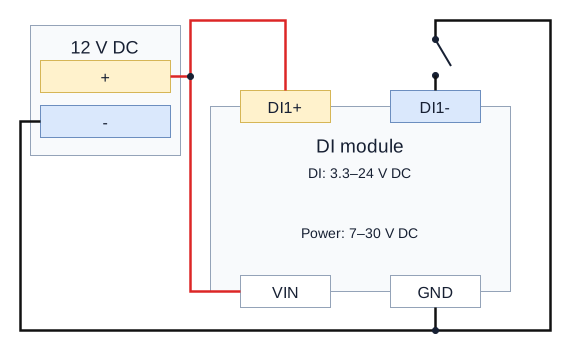
Connect the contact in an externally powered input loop. The 12 V example connects supply positive to DI1+ and VIN, and connects DI1- through the contact to supply negative / GND. Repeat with each channel's own DIn+ / DIn- pair. Keep the input excitation within 3.3-24 VDC.
Wet Contact Input
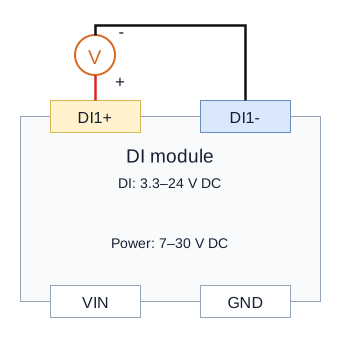
Connect active signal positive to DI1+ and signal negative to DI1-. Power the module separately through VIN/GND. The signal must remain within 3.3-24 VDC.
Input Check
Use a known 12 V switch circuit, hold the contact open and closed for about one second, and read DI1 using function 02, start address 0x0000, quantity 1. For other channels and serial settings, see the Technical Manual.
Serial Wiring
Use the ordered RS485 or RS232 interface. On combined labels, TX/A+ is RS485 A or RS232 TX, and RX/B- is RS485 B or RS232 RX.
RS485
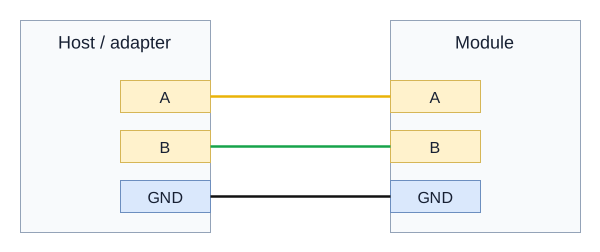
Connect A to A, B to B, and the signal reference to GND. Use twisted pair and a line topology. Add 120-ohm termination at the two physical ends when required by bus length and speed.
RS232
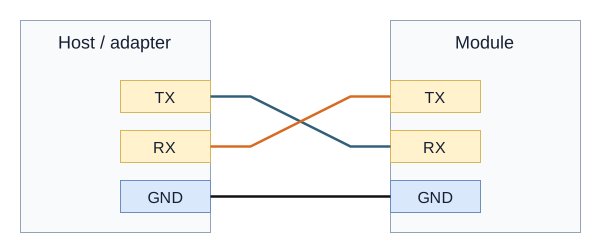
Connect host TX to module RX, host RX to module TX, and GND to GND. A USB-to-RS232 adapter is required for an RS232 module; a TTL adapter is unsuitable.
Commissioning
- Check power voltage, polarity, signal range, and terminal labels with power off.
- Apply module power and check the power indicator.
- Match the host serial settings and device address to the supplied configuration.
- Test one channel with a known signal or receiver before connecting the remaining channels.
- Confirm values or output setpoints using the communication instructions in the specification.
- Manufacturer: Hunan YenGear Tech Co., Ltd.
- Email: [email protected]
- Website: www.yengear.com