
Appearance
Y961 Irrigation Controller Specification
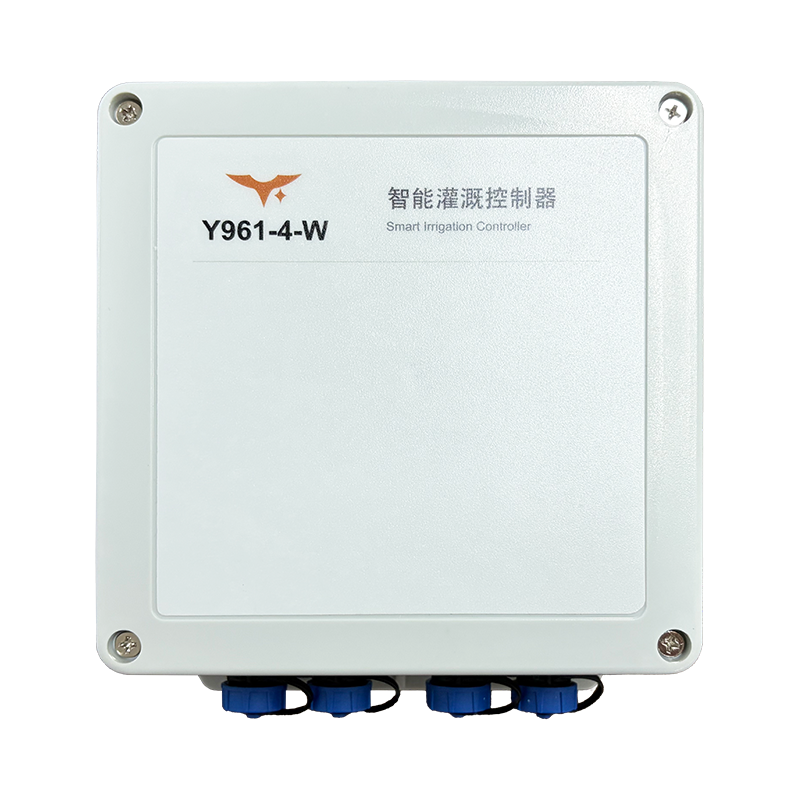
Applicable models: Y961-2-W and Y961-4-W
Use this specification for model selection, rating checks, and installation limits. Terminal numbering, wiring drawings, and the delivered configuration follow the device markings and supplied documents.
Contents
- Overview
- Ordering Information
- Key Features
- Technical Specifications
- Interfaces
- Mechanical and Ingress Protection
- Installation and Wiring Limits
1. Overview
Y961 controls solenoid valves and other irrigation loads through two or four independent switched power outputs. It connects over Wi-Fi to the Smart Irrigation Control System, which manages devices, irrigation zones, and schedules.
text
Smart Irrigation Control System
        ↓ Device management, zone binding, schedule publication
Y961 Irrigation Controller
        ↓ Stores and executes published schedules locally
Irrigation loads
After receiving a valid configuration from the system, Y961 operates each circuit according to the published schedules. See the User Manual for time-synchronization, network-loss, and restart behavior.
2. Ordering Information
text
Y961 - Circuits - W
2 / 4| Model | Circuits | Network | Application |
|---|---|---|---|
| Y961-2-W | 2 | Wi-Fi | Two irrigation load circuits |
| Y961-4-W | 4 | Wi-Fi | Four irrigation load circuits |
Both models share the control logic, power-supply options, output interface, per-circuit load rating, enclosure material, ingress protection, and dimensions. They differ in circuit count and total unit current limit. Confirm system integration and firmware support for Y961-2-W at delivery; do not apply the four-circuit system configuration directly to the two-circuit model.
3. Key Features
- Two or four independently controlled irrigation load circuits
- Wi-Fi network access
- Device, zone, and schedule management through the Smart Irrigation Control System
- Local storage and execution of published irrigation schedules
- Sequential or simultaneous irrigation with one-time, daily, or weekly schedules
- AC 220 V or DC 7–30 V input, selected according to the delivered configuration
- Relay-switched power outputs with the same power type as the input
- Maximum 5 A per circuit, with separate total current limits for the two- and four-circuit models
- ABS enclosure with IP66 ingress protection
- Supplied connectors rated IP66 and 5 A
4. Technical Specifications
4.1 General Parameters
| Parameter | Y961-2-W | Y961-4-W |
|---|---|---|
| Control circuits | 2 | 4 |
| Network | Wi-Fi | Wi-Fi |
| Input supply | AC 220 V or DC 7–30 V; select one | AC 220 V or DC 7–30 V; select one |
| Output | Input power switched through relays | Input power switched through relays |
| Maximum current per circuit | 5 A | 5 A |
| Maximum total unit current | 10 A | 20 A |
| Dimensions | 150 × 150 × 60 mm | 150 × 150 × 60 mm |
| Enclosure material | ABS | ABS |
| Product ingress protection | IP66 | IP66 |
4.2 Load Ratings
| Parameter | Rating |
|---|---|
| Maximum switching current per circuit | 5 A |
| AC load rating | Up to 250 VAC and no more than 5 A per circuit |
| DC load rating | Up to 30 VDC and no more than 5 A per circuit |
| Two-circuit model total current | No more than 10 A |
| Four-circuit model total current | No more than 20 A |
| Standard controlled loads | Solenoid valves and other irrigation loads within the ratings |
Meet both the individual circuit limit and the total unit limit. The 250 VAC value is a switching load rating; it does not mean that the controller accepts 250 VAC input or provides regulated output. Actual output voltage follows the input supply. For inductive loads, high starting currents, or motors, confirm starting current, protection, and any external contactors during project design.
5. Interfaces
5.1 Power Input
- AC configuration: AC 220 V, identified by
L / N. - DC configuration: DC 7–30 V, identified by
+ / -. - Use only one input supply type on a unit. Never connect AC and DC simultaneously.
- The input supply type determines the output supply type. Do not use the AC configuration as a DC source, or the DC configuration as an AC source.
5.2 Irrigation Load Outputs
Each circuit has a two-core power output connection:
| Input Configuration | Output Markings | Output Function |
|---|---|---|
| AC 220 V | L / N | Supplies AC power to the load when the relay closes |
| DC 7–30 V | + / - | Supplies DC power to the load when the relay closes |
The standard output supplies relay-switched input power. It is not a passive dry contact. Wire according to the input configuration, load type, and terminal markings.
5.3 Network
| Model Suffix | Network Interface |
|---|---|
-W | Wi-Fi |
The series uses Wi-Fi. The two models share the irrigation scheduling approach; confirm the delivered model's firmware and system support before commissioning.
6. Mechanical and Ingress Protection
| Parameter | Specification |
|---|---|
| Product dimensions | 150 × 150 × 60 mm |
| Enclosure material | ABS |
| Product ingress protection | IP66 |
| Supplied connector ingress protection | IP66 |
| Supplied connector current rating | 5 A |
IP66 applies under the specified dust and water-jet conditions. Assemble the enclosure, seals, and connectors correctly. Do not immerse the device or operate it with the enclosure open.
7. Installation and Wiring Limits
- Have personnel with the required electrical skills install and wire the device.
- Disconnect the input supply and confirm that both the controller and loads are de-energized before wiring.
- Confirm AC 220 V or DC 7–30 V from the delivered configuration. Never connect both supplies to one unit.
- Use
L / Nfor AC and+ / -for DC. Follow the device markings and supplied wiring documents for terminal numbering. - Keep each circuit within 5 A and the total within the selected model's current limit.
- Provide fusing, overcurrent protection, and surge protection according to the project design. Do not select motors, pumps, or other high-inrush loads using ordinary valve-load assumptions.
- Check terminal tightness, connector locking, cable sealing, and enclosure closure before applying power.
- Manufacturer: Hunan YenGear Tech Co., Ltd.
- Address: Room 21014, Building 1, Fudi Xingguang Tiandi, Yingxin Road, Yuhua District, Changsha, Hunan, China
- Email: [email protected]
- Website: www.yengear.com