
Appearance
Y401-0011/0044-L Wireless Analog I/O Module User Manual
Product Introduction
Applicable models: Y401-0011-L and Y401-0044-L.
Two Y401 analog modules use a point-to-point LoRa link to reproduce an input signal at the matching remote analog output. Each Y401-0011-L module has 1 AI and 1 AO for 4-20 mA signals. Each Y401-0044-L module has 4 AI and 4 AO, with either a 4-20 mA or a 0-10 V configuration selected when ordering. These models have no digital input or relay output channels.
Use the linked model specifications for dimensions, electrical ratings, accuracy, radio parameters, and environmental limits.
Operating Logic
Channel Mapping
| Y401-0011-L | Y401-0044-L |
|---|---|
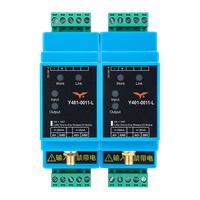 | 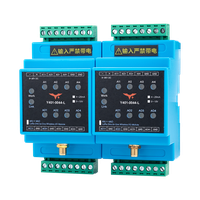 |
Y401-0011-L and Y401-0044-L use two devices, A and B. An input at one device drives the matching analog output at the other device in either direction.
| Model | I/O per Device | Device A to Device B | Device B to Device A |
|---|---|---|---|
| Y401-0011-L | 1 AI + 1 AO | A AI1 → B AO1 | B AI1 → A AO1 |
| Y401-0044-L | 4 AI + 4 AO | A AI1–AI4 → B AO1–AO4, channel by channel | B AI1–AI4 → A AO1–AO4, channel by channel |
The 4–20 mA versions use a half-duplex wireless link. Match the purchased signal version throughout the source, module pair, and receiving instrument.
Communication Loss
Before connecting a control load, test the output during link loss and recovery with the load isolated. Do not rely on an assumed held value, zero output, or timeout reset. Provide independent protection for the controlled process.
Installation and Wiring
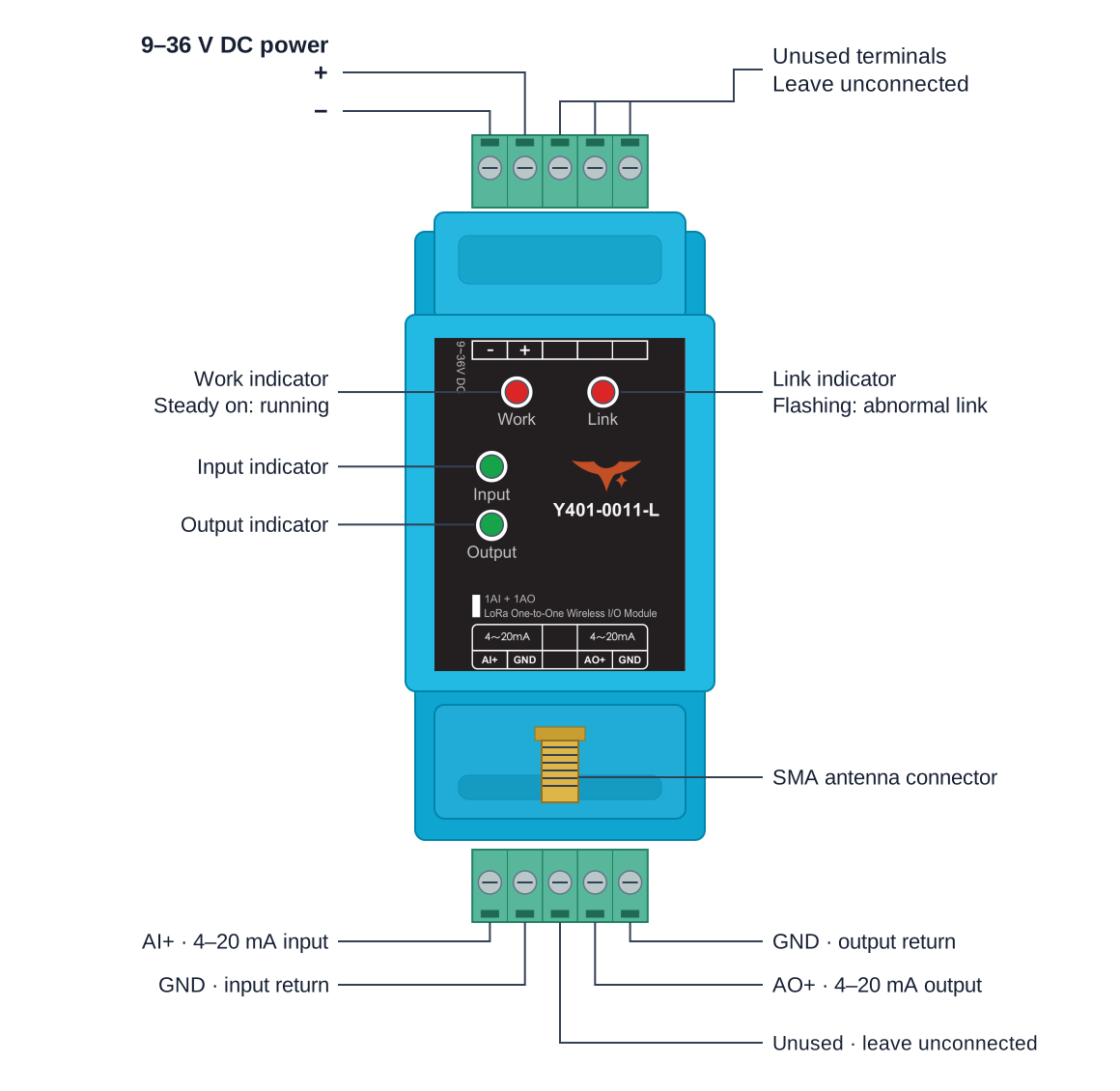
The cover shows Y401-0011-L. For Y401-0044-L terminal positions, see the model layout. GND markings do not establish galvanic isolation between channels or between signal and power circuits.
Power Wiring
Confirm the model and supplied signal version before connecting power or instruments. Each module requires local DC power; the field transmitter and receiving instrument must also receive power according to their own ratings.
Connect a 9-36 V DC supply to the marked power positive and negative terminals of each module. This supply range applies to both models and both Y401-0044-L signal versions. Check polarity and keep power off while wiring.
Antenna Installation
- Connect the matching antenna supplied for each module. The 4-20 mA versions of both models specify 398 to 525 MHz and a 470 MHz magnetic-mount antenna option. Use the supplied radio configuration and matching antenna for the Y401-0044-L voltage version.
- Mount antennas vertically in an open location, about 2 m above ground when possible. Keep them away from large metal structures and outside metal cabinets.
- Tighten the antenna connectors and check reception at the installed locations.
- Mount Y401-0011-L and the Y401-0044-L 4-20 mA version on a stable 35 mm DIN rail. Follow the supplied enclosure drawing for the Y401-0044-L voltage version.
4-20 mA Input Wiring
Both current versions accept active 4–20 mA signals with a current-source voltage of at least 10 V and an input current limit of 24 mA. Power a two-wire transmitter from an external loop supply.
Disconnect power before wiring. Select the field transmitter supply according to its rating and the analog input source requirement.
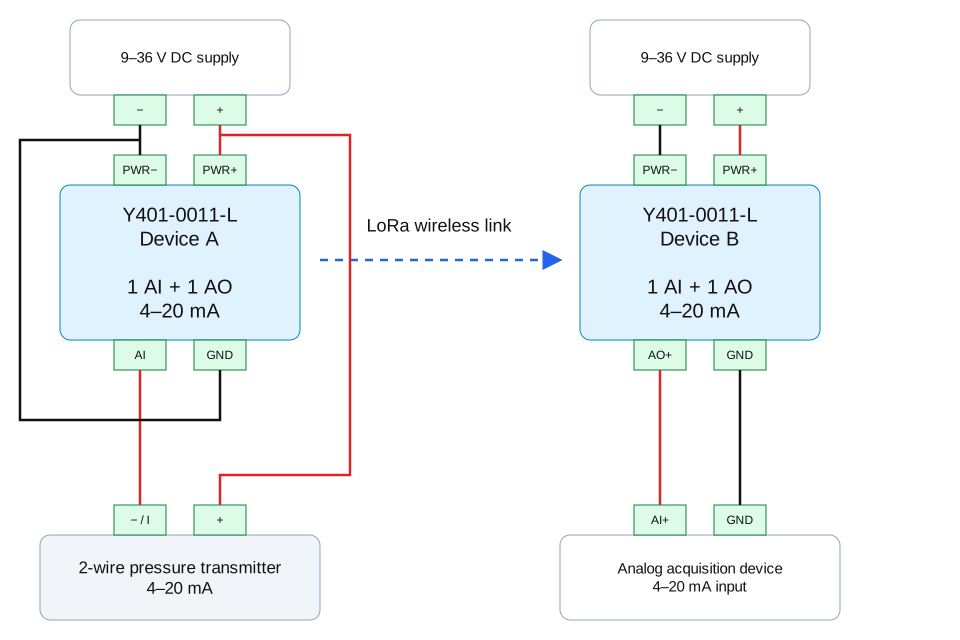
Two-Wire Current Transmitter
- Connect the external loop supply positive to the transmitter positive.
- Connect the transmitter current-return terminal to the module analog input positive.
- Connect the module input ground/negative to the loop supply negative.
The transmitter loop and module may use separate supplies. A shared supply is also possible when it meets both the transmitter requirements and the module's 9-36 V DC rating. Keep the loop return connected as shown; sharing a supply does not make the AI terminal a sensor power output.
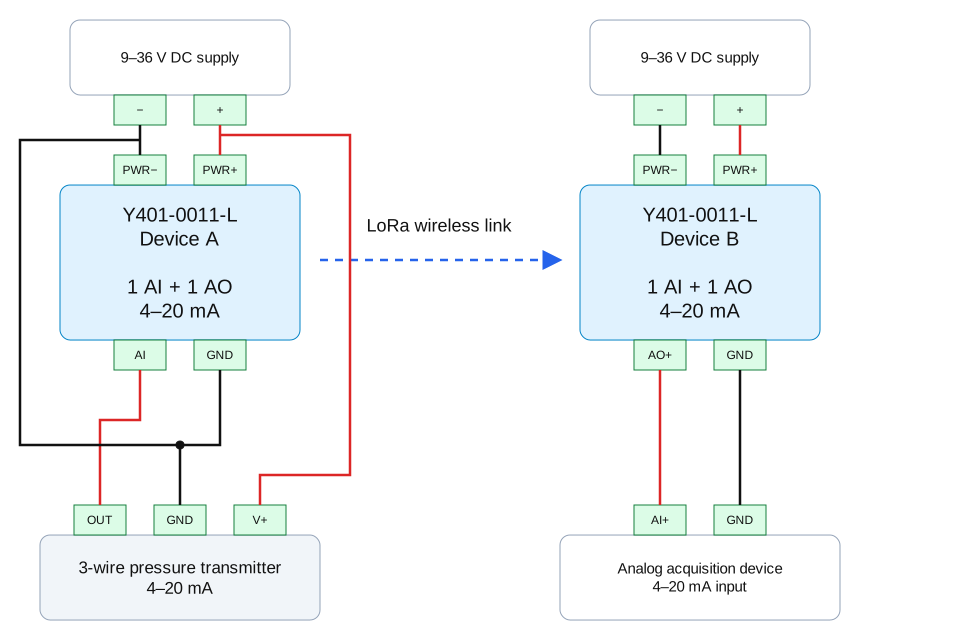
Three-Wire Current Transmitter
- Connect the transmitter power positive to its external supply positive.
- Connect the transmitter common ground to the supply negative and module input ground/negative.
- Connect the transmitter signal output to the module analog input positive.
Four-Wire Current Transmitter or Signal Generator
- Connect the instrument power pair to its rated supply.
- Connect the separate signal positive to the module analog input positive.
- Connect the signal negative to the module input ground/negative.
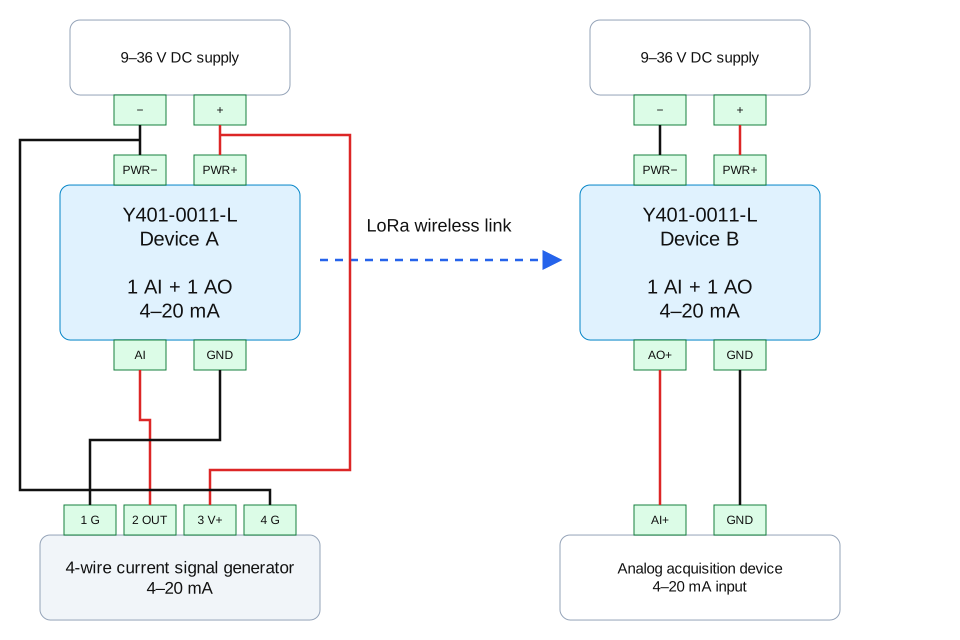
The same current-loop arrangements apply to Y401-0044-L. Use AI1+ and input GND for channel 1, then repeat for channels 2–4 using the matching AI and AO terminals. The four inputs share the input GND terminals. Follow actual instrument labels and polarity; wire colors and instrument terminal numbers in an example are not universal standards.
Current inputs
Do not connect a voltage signal or an external voltage source directly across an input configured for 4-20 mA. An external loop supply powers the transmitter through the current loop; it must not be wired directly across the module input.
4-20 mA Output Wiring
For the 4-20 mA versions, each analog output uses two signal wires: connect AO+ to the receiving instrument's signal positive and GND to its signal negative. On Y401-0044-L, use the GND adjacent to the selected AO terminal. The output is an active constant-current source and connects directly to a compatible passive current input. The module's 9-36 V DC power connection is separate from the AO signal pair.
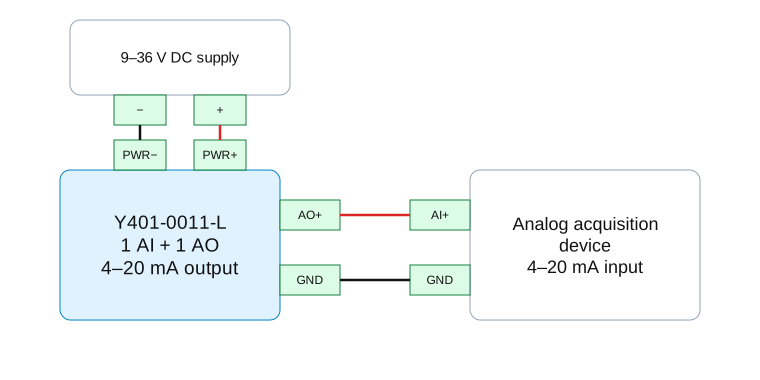
Keep the total receiving load at or below 500 ohms and verify the supply voltage provides sufficient output headroom. At 20 mA, a 500 ohm load alone needs 10 V, so the 9 V minimum module supply does not establish operation at the maximum load. Include receiver resistance, wiring, and any series resistor in the load calculation.
The two-, three-, and four-wire transmitter descriptions apply to the AI side. The AO connection uses the same two signal wires in each arrangement. Do not connect an active AO directly to another active current source or treat it as a voltage output.
Y401-0044-L 0-10 V Wiring
Use a voltage-configured pair with 9-36 V DC module supplies, voltage-output transmitters, and voltage-input receivers.
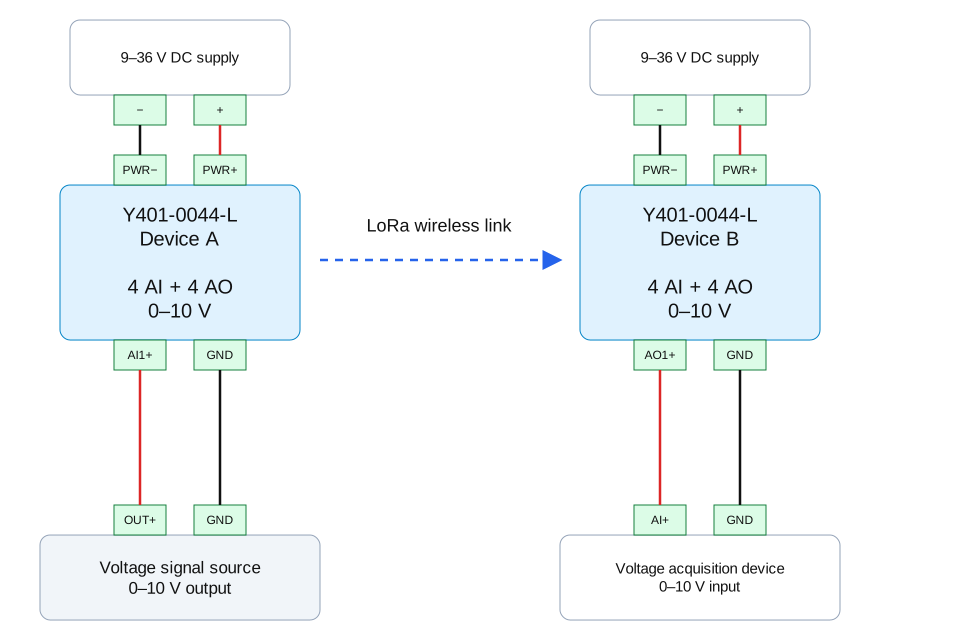
The diagram shows channel 1. Connect the source OUT+ to Device A AI1+ and its signal return to input GND. Connect Device B AO1+ to the receiver's voltage input positive and the adjacent output GND to its signal return. Repeat with matching channel numbers for channels 2-4.
The source and receiver connections shown are signal pairs. Wire instrument power separately according to each instrument's rating; these signal wires are not a two-wire current-loop supply.
Three-wire voltage transmitters share their power and signal return. Four-wire voltage instruments have separate power and signal pairs. The two-wire 4-20 mA loop arrangement does not apply to a 0-10 V signal.
Do not exceed 10 V at a voltage input. Check the voltage output's minimum load resistance and the receiver input impedance before connection; the current-version 500 ohm load limit does not define the voltage-version load requirements.
Pairing and Configuration
Use the supplied matched pair. Standard 4–20 mA pairs are factory paired and need no on-site configuration for normal operation. Contact YenGear for model-specific replacement or re-pairing instructions. Do not apply the digital models' three-wire pairing procedure to analog signal terminals.
Commissioning
Initial Setup
Before power-up, check the model, signal version, matched pair, antennas, power polarity, signal returns, and output loading. Isolate control loads during the tests.
LED Indicators
These states apply to Y401-0011-L and the Y401-0044-L 4–20 mA version. Follow the supplied indicator instructions for a voltage-configured Y401-0044-L.
| LED | State |
|---|---|
| Work | On after startup |
| Link | On when connected; off when disconnected; flashing during abnormal communication |
| Input / AI1–AI4 | On when input current is detected; off when no current is detected |
| Output / AO1–AO4 | On while output current is produced; off when no current is produced |
LEDs indicate signal activity, not measurement accuracy.
Functional Checks
- Apply known signals within the nominal range. For example, test 4, 12, and 20 mA on a current version, or 0, 5, and 10 V on the Y401-0044-L voltage version. Measure current in series using DC mA mode, or voltage across AO+ and its return using DC voltage mode.
- Compare the source and remote output at each test point against the accuracy limits in the corresponding Y401-0011-L or Y401-0044-L specification. Input and output accuracy are separate limits, not a stated end-to-end accuracy; include instrument errors when assessing the complete signal path.
- Repeat for each Y401-0044-L channel and test the reverse direction if used. Check that only the corresponding remote channel follows each test signal.
- Validate operation at the installed locations before connecting the signal to a control loop. Check communication-loss behavior with control loads isolated, as described under Operating Logic.
A signal generator can replace the field transmitter for a bench test. Set it to source 4–20 mA, connect it to Device A AI+/input GND, and connect Device B AO+/output GND to a passive current input or a multimeter in DC mA mode. Apply a known value, such as 12 mA, and compare the received reading. Power the modules through their separate power terminals.
Troubleshooting
| Symptom | Checks |
|---|---|
| No remote analog signal | Check local power at both modules, the matched pair, antennas, source signal, and input/output polarity. For a two-wire transmitter, check its external loop supply. |
| Wrong output channel | Trace the source AI number to the matching remote AO number; on Y401-0044-L, check the adjacent output GND. |
| Current drops or cannot reach 20 mA | Check total output loop resistance and supply headroom, transmitter supply, and current-source voltage. |
| Reading has an offset or incorrect scale | Check the supplied signal version, receiver range/scaling, shared signal returns, meter mode, and the separate input/output accuracy limits. |
| Signal changes after a link interruption | Isolate the control load, inspect link and antenna conditions, and evaluate the actual output behavior before restoring control. |
Safety Notes
- Disconnect power before wiring and check polarity and the signal version before applying power.
- Keep current and voltage signals within the limits for the supplied version. Do not connect an active current output to another active current source.
- Protect the modules from liquids, heat, heavy dust, and strong sources of radio interference. Use a suitable enclosure; do not install in explosive environments or disassemble the modules.
- Do not use the wireless signal as the sole path for emergency-stop or personnel-safety functions. Validate the complete system before closed-loop control.
- Manufacturer: Hunan YenGear Tech Co., Ltd.
- Address: Room 21014, Building 1, Fudi Xingguang Tiandi, Yingxin Road, Yuhua District, Changsha, Hunan, China
- Email: [email protected]
- Website: www.yengear.com