
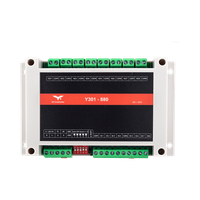
Appearance
Y301 ControlLink Series Serial I/O Modules User Manual
Applicable models: Y301-220, Y301-222, Y301-440, Y301-444, Y301-880.
- Y301-220/222 Specification | Technical Manual
- Y301-440/444 Specification | Technical Manual
- Y301-880 Specification | Technical Manual
Product Overview
ControlLink modules are serial I/O modules with digital inputs (DI), relay outputs (DO), and optional analog inputs (AI). They connect via RS485 using Modbus RTU.
Key features:
- Integrated DI and DO on all models
- RS485 standard; RS232 and TTL available on selected models
- 5-36 VDC power supply
- Dry and wet contact DI support
- Relay outputs for valves, lights, alarms, and contactors
- AI on Y301-222 and Y301-444; order the voltage or current terminals required by the sensor
- DIN-rail or screw mounting
Model Naming

The positions after Y301- represent DI / DO / AI / AO channel counts on one module. 0 means no channels of that type. Models without AO use three characters for DI, DO, and AI; models with AO retain the fourth position.
| Code | Channel count |
|---|---|
0–9 | 0–9 |
A | 10 |
G | 16 |
W | 32 |
Interface options are specified separately from the I/O code; use the configuration table in the relevant specification.
For example, Y301-220 has 2 DI and 2 DO with no analog I/O; Y301-222 adds 2 AI. Y301-444 has 4 DI, 4 DO, and 4 AI. All ControlLink models listed in this manual have no AO.
Model Selection
| Product | Model | DI | DO | AI | Documentation |
|---|---|---|---|---|---|
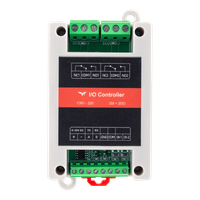 | Y301-220 | 2 | 2 | 0 | More Details |
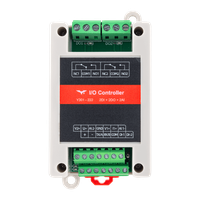 | Y301-222 | 2 | 2 | 2 | More Details |
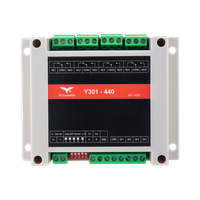 | Y301-440 | 4 | 4 | 0 | More Details |
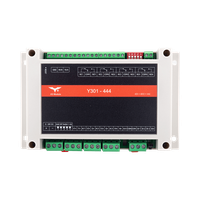 | Y301-444 | 4 | 4 | 4 | More Details |
 | Y301-880 | 8 | 8 | 0 | More Details |
Default Parameters
| Parameter | Default Value |
|---|---|
| Communication protocol | Modbus RTU |
| Device address | 1 |
| Baud rate | 9600 bps |
| Data bits / Stop bits / Parity | 8 / 1 / None |
| Power supply | 5-36 VDC |
Note: Each RS485 device must have a unique address. Changes to address or baud rate require a restart. If communication fails, verify address, baud rate, A/B polarity, and GND connection.
Hardware Interfaces (Y301-444 Example)
The following uses Y301-444 (4 DI, 4 DO, 4 AI) as an example.
| Interface Area | Terminal | Description |
|---|---|---|
| Power | +, - | 5-36 VDC; use the terminal labels on the supplied module |
| Communication | A, B, GND | RS485 terminals |
| DI Input | DI1-DI4, COM/COM-, COM+ | Inputs, common reference, and supply positive |
| DO Output | COMn, NOn, NCn | Y301-220/222/440/444 relay contacts; Y301-880 has COMn / NOn only |
| AI Input | Vn+, In+, AIn- | Voltage positive, current positive, and signal return; n = channel number |
| DIP Switch | SW1~SW5 | Address offset; see technical manual |
| Reload Button | Reload / Reset | Restore defaults or restart |
DO terminal definitions (where fitted):
COM: CommonNO: Normally open (closes when relay on)NC: Normally closed (opens when relay on)
Wiring precautions:
- Power off before wiring
- Use shielded twisted pair for RS485; add 120Ω termination at both ends of long runs
- Add flyback diodes, RC snubbers, or surge protection for inductive loads
- Relay rating: 277 VAC / 10 A or 28 VDC / 10 A
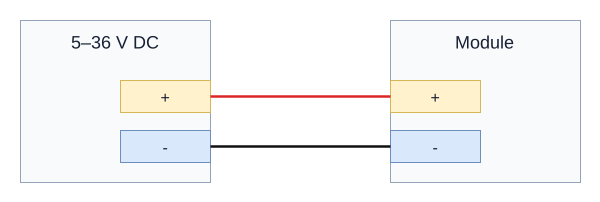
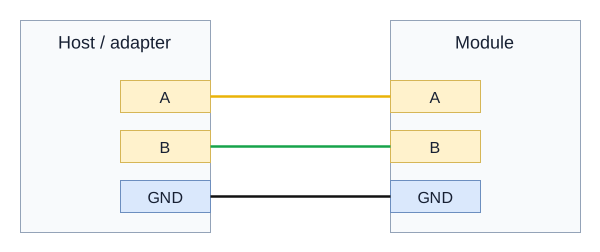
Wire colours: positive (+) red, negative (-) black, RS485 A yellow, and RS485 B green. Identify each connection by its terminal label.
Power and Serial Wiring
Disconnect power before changing connections. The terminal drawings show electrical connections, not the physical order of the connector pins. Use only the serial interface fitted to the ordered module.
DC Power
Connect a 5-36 VDC supply to + and -.
RS485
Connect host A to module A, B to B, and the signal reference to GND. On a combined label, TX/A is A and RX/B is B. Use a twisted pair for A/B, a line topology, and 120-ohm termination at the two physical ends of a long bus.
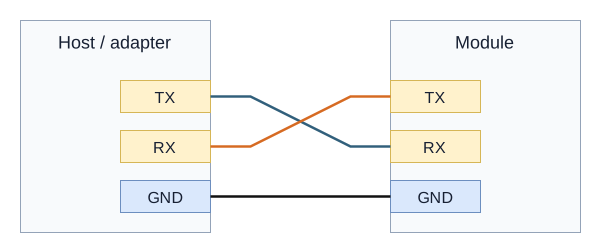
RS232 or TTL Variants
Cross TX and RX and connect GND to GND. Use an adapter with the same electrical interface as the module. Confirm the fitted TTL logic voltage before connection; RS232 and TTL require different adapters.
DI Wiring Diagram
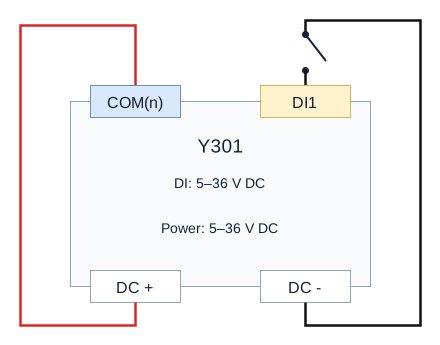
The DI excitation / active signal range is 5-36 VDC. Use the circuit for the terminal arrangement on the module; a DI common and a relay common are different terminals.
| Model | Input terminals | Dry-contact circuit |
|---|---|---|
| Y301-220 / Y301-222 | COM, DI1-DI2 | Single COM |
| Y301-440 | COM, DI1-DI4 | Single COM |
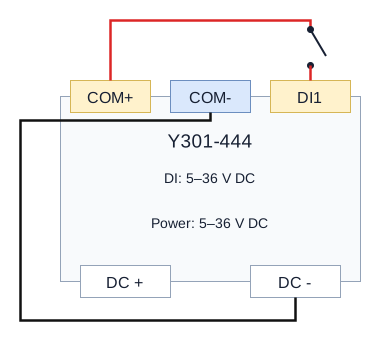
| Y301-444 | COM+, COM-, DI1-DI4 | Separate COM+ / COM- |
| Y301-880 | Input COM1 for DI1-DI4; input COM2 for DI5-DI8 | Two input banks |
Dry Contact - Common Terminal
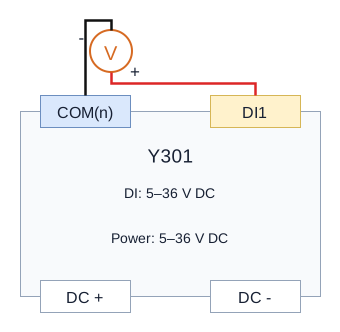
For Y301-220/222/440 and each Y301-880 input bank, the shared dry-contact circuit connects supply positive to the input common and each contact between its DI and supply negative. In the shared drawings, COM(n) means COM on Y301-220/222/440, or the bank common on Y301-880: input COM1 for DI1-DI4 and input COM2 for DI5-DI8. These input commons are separate from the relay COM terminals. Use the separate polarity shown below for an active signal.
Dry Contact - COM+ / COM-
For Y301-444, COM+ provides module supply positive. Connect the contact between COM+ and its DI, and connect COM- to supply negative.
Wet Contact Input
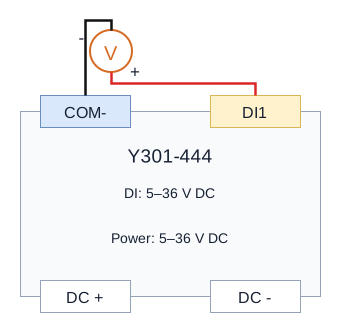
Connect active signal positive to DI and signal negative to its input COM / COM-. On Y301-880, use the input common for that bank. Supply the module through its DC terminals. Leave Y301-444 COM+ unused in this active-signal circuit.
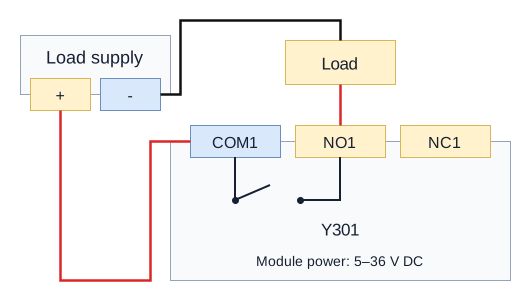
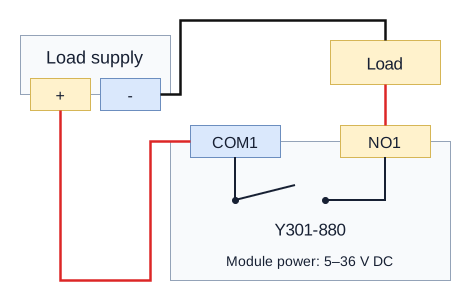
Relay contacts require an external load supply. The drawings use a low-voltage load; select protection and suppression for the actual load and relay contact rating. Module DC power and load power are separate connections.
Y301-220 / 222 / 440 / 444
Route load supply through COMn and NOn for normally-off operation. NCn is available for normally-on operation on these models; it is unused in the illustrated COM/NO load circuit.
Y301-880
Each output exposes COMn and NOn only; no NC terminal is exposed.
AI Wiring Diagram
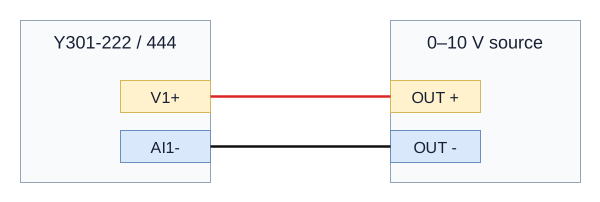
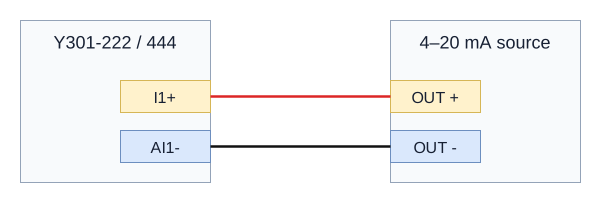
Y301-222 and Y301-444 provide AI. Select the ordered input range and use one signal type per channel. Leave the unused voltage or current positive terminal disconnected.
Voltage Input
For a 0-10 V source, connect signal positive to V1+ and signal return to AI1-.
Current Input - Powered Source
For a powered 4-20 mA source with a separate signal pair, connect signal positive to I1+ and signal return to AI1-. Power the source according to its specification.
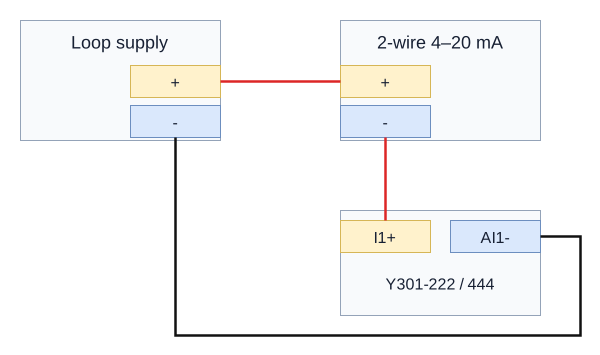
Current Input - Two-Wire Transmitter
Connect loop supply positive to transmitter positive, transmitter negative to I1+, and AI1- to loop supply negative. Choose the loop supply for the transmitter and input burden; it is not a module power-output terminal.
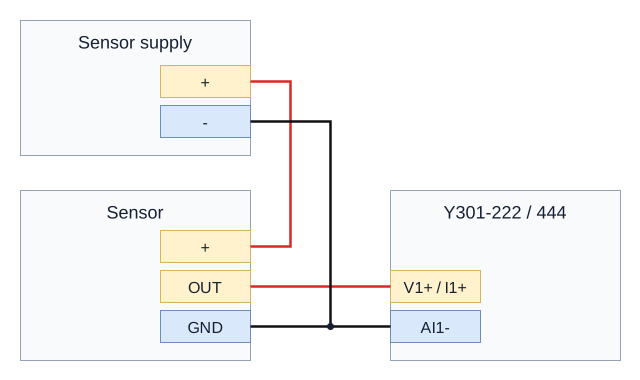
Three-Wire Sensor
Connect sensor supply positive to its power input. Connect sensor GND, supply negative, and AI1- together. Connect sensor OUT to V1+ for the fitted voltage range, or I1+ for the fitted current range.
- Manufacturer: Hunan YenGear Tech Co., Ltd.
- Email: [email protected]
- Website: www.yengear.com