
Appearance
Y301 MiniLink Series Serial I/O Modules User Manual
Applicable models: Y301-110, Y301-200, Y301-020.
Product Overview
MiniLink modules acquire switch states and control relay contacts over Modbus RTU. The three models provide one or two digital I/O channels.
Key features:
- RS485 standard; RS232 and TTL available on selected models
- 5-36 VDC power supply
- Dry and wet contact DI support
- Relay outputs for valves, lights, alarms, and actuators
- DIN-rail or screw mounting
Model Naming

The positions after Y301- represent DI / DO / AI / AO channel counts on one module. 0 means no channels of that type. Models without AO use three characters for DI, DO, and AI; models with AO retain the fourth position.
| Code | Channel count |
|---|---|
0–9 | 0–9 |
A | 10 |
G | 16 |
W | 32 |
Interface options are specified separately from the I/O code; use the configuration table in the relevant specification.
For example, Y301-110 has 1 DI and 1 DO; Y301-200 has 2 DI only; Y301-020 has 2 DO only. All three models have no AI or AO.
Model Selection
| Product | Model | DI | DO |
|---|---|---|---|
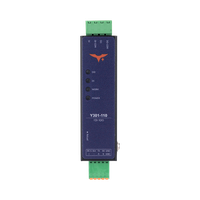 | Y301-110 | 1 | 1 |
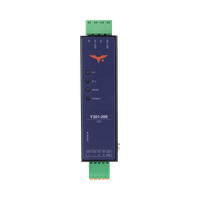 | Y301-200 | 2 | 0 |
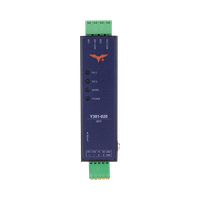 | Y301-020 | 0 | 2 |
Default Parameters
| Parameter | Default Value |
|---|---|
| Communication protocol | Modbus RTU |
| Device address | 1 |
| Baud rate | 9600 bps |
| Data bits | 8 |
| Stop bits | 1 |
| Parity | None |
| Power supply | 5-36 VDC |
Note: Each RS485 device must have a unique address. Changes to address or baud rate require a restart. If communication fails, verify address, baud rate, A/B polarity, and GND connection.
Hardware Interfaces
| Interface Area | Y301-110 | Y301-200 | Y301-020 |
|---|---|---|---|
| Power | +, - | +, - | +, - |
| Communication | A, B, GND | A, B, GND | A, B, GND |
| DI Input | DI, DI-COM | DI1, DI1-COM, DI2, DI2-COM | None |
| DO Output | DO, DO-COM | None | DO1, DO1-COM, DO2, DO2-COM |
| Reload Button | Reload / Reset | Reload / Reset | Reload / Reset |
DO terminals: MiniLink provides normally-open relay contact pairs. DO-COM is the relay common on Y301-110; Y301-020 has a separate DO1-COM / DO2-COM for each output. These are separate from the DI return terminals. No NC terminal is exposed on these models.
Wiring precautions:
- Power off before wiring
- Use shielded twisted pair for RS485; add 120Ω termination at both ends of long runs
- Add flyback diodes, RC snubbers, or surge protection for inductive loads
- Relay rating: 125 VAC / 0.5 A or 30 VDC / 2 A
Wire colours: positive (+) red, negative (-) black, RS485 A yellow, and RS485 B green. Identify each connection by its terminal label.
Power and Serial Wiring
Disconnect power before changing connections. The terminal drawings show electrical connections, not the physical order of the connector pins. Use only the serial interface fitted to the ordered module.
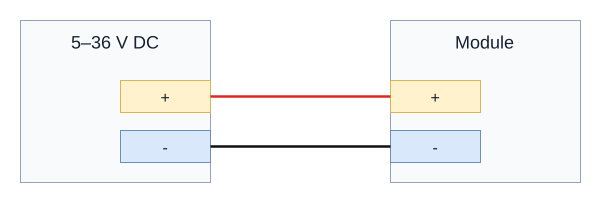
DC Power
Connect a 5-36 VDC supply to + and -.
RS485
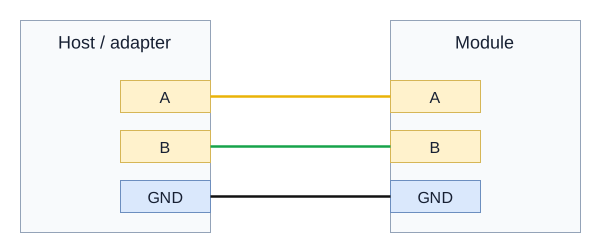
Connect host A to module A, B to B, and the signal reference to GND. On a combined label, TX/A is A and RX/B is B. Use a twisted pair for A/B, a line topology, and 120-ohm termination at the two physical ends of a long bus.
RS232 or TTL Variants
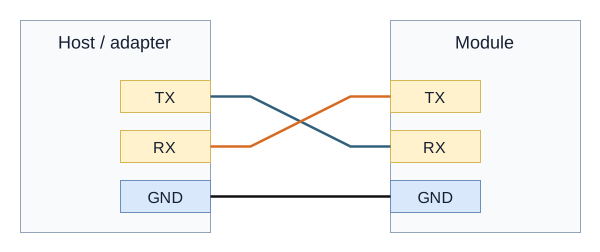
Cross TX and RX and connect GND to GND. Use an adapter with the same electrical interface as the module. Confirm the fitted TTL logic voltage before connection; RS232 and TTL require different adapters.
DI Wiring
The DI excitation / active signal range is 5-36 VDC, matching module power. Y301-020 has no DI. Keep each input paired with its corresponding DI-COM.
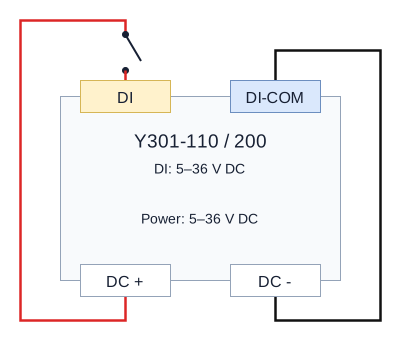
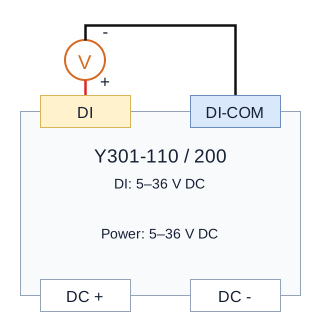
The shared drawings show one channel. Use the corresponding terminal pair on the supplied model:
| Diagram label | Y301-110 | Y301-200 |
|---|---|---|
DI | DI | DI1 or DI2 |
DI-COM | DI-COM | The matching DI1-COM or DI2-COM |
Dry Contact Input
Connect supply positive through the contact to DI, and supply negative to its matching DI-COM. A passive rain-gauge contact connected only across DI and DI-COM does not complete this externally powered circuit. Repeat the same circuit for any additional input channel.
Wet Contact Input
Connect active signal positive to DI / DI1 / DI2 and signal negative to its corresponding DI-COM. Supply the module separately at its DC terminals. The drawings do not require a bond between the signal return and module power negative.
First Input Check
With output loads disconnected, use a known passive switch and hold it closed and open for about one second each. Check the DI LED and read DI1 with function 02, starting address 0x0000, quantity 1. Read its pulse counter with function 03, starting address 0x0500, quantity 2 registers. Polling a short pulse can miss the instantaneous state; the counter records accepted edges.
DO Wiring Diagram
Applicable models: Y301-110 and Y301-020. The relay contacts switch an external load supply; they do not provide output voltage.
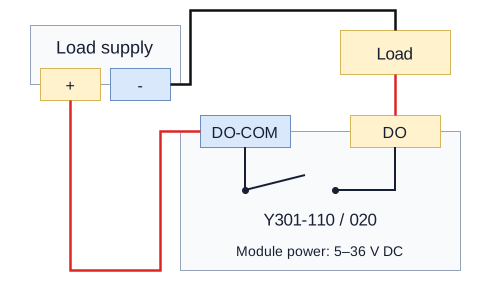
Use DO / DO-COM on Y301-110, or the selected DOn / DOn-COM pair on Y301-020. The drawing shows a normally-open contact and a separate low-voltage load supply. Keep within the relay rating of 125 VAC / 0.5 A or 30 VDC / 2 A. Provide suitable load protection and suppression for inductive loads.
- Manufacturer: Hunan YenGear Tech Co., Ltd.
- Email: [email protected]
- Website: www.yengear.com