
Appearance
Y412-22/44/88-L Wireless I/O Module User Manual
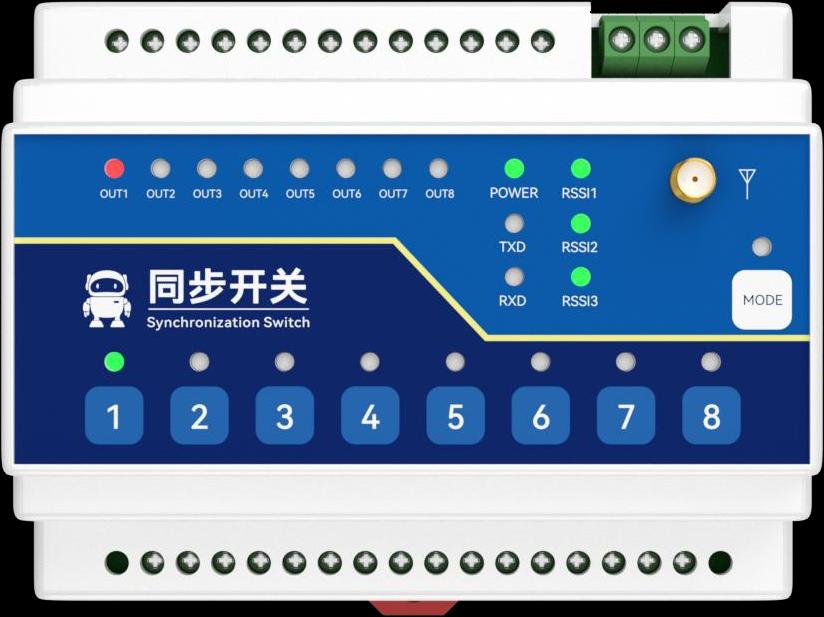
Product Introduction
Applicable models: Y412-22-L, Y412-44-L, and Y412-88-L.
Y412 links dry-contact or NPN inputs to remote relay outputs over LoRa. Select the master/slave role, control direction, and momentary or latching action with the DIP switches. Local keys allow channel-by-channel testing.
Use the specification for channel counts, electrical ratings, radio parameters, dimensions, and AC/DC supply options.
Operating Logic
Use one master in each communication group. All group members need matching channel settings and compatible control modes.
| Mode | Behavior |
|---|---|
| Bidirectional follow | Master and slave inputs can trigger the remote output |
| Unidirectional feedback | The master drives the slave; the slave returns output-state feedback |
| Momentary | Output remains on while the input is active |
| Latching | Each short press toggles the output on or off |
Test communication-loss and power-recovery behavior before connecting operational loads. Timeout reset is an advanced configuration setting; check the supplied configuration rather than assuming it is enabled.
Installation and Wiring
Before Wiring
Disconnect module and load power. Confirm the model, channel count, and AC or DC supply version from the unit label. Connect the antenna before power-up and keep it clear of large metal surfaces. Mount the module on a 35 mm DIN rail in a suitable enclosure.
Power Wiring
| Hardware version | Supply | Connections |
|---|---|---|
| DC | 8–28 V DC | Positive → V+; negative → V−; protective earth → PE |
| AC | 85–265 V AC | Live → L; neutral → N; protective earth → PE |
Use the supply rating printed on the unit. Check polarity on the DC version. AC wiring must be performed by qualified personnel.
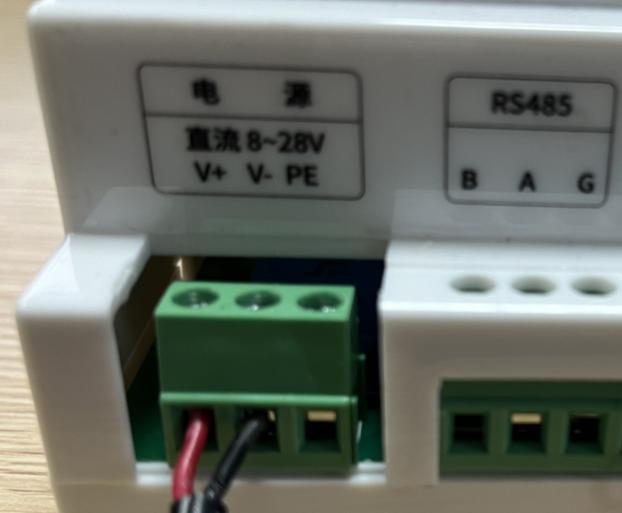
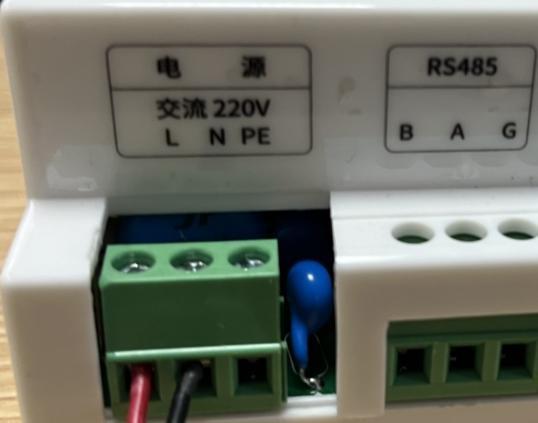
Input Wiring
Connect each passive switch between its selected DI and input COM. Multiple switch contacts can share input COM. For an NPN open-collector sensor, connect its signal output to DI and its 0 V reference to input COM; power the sensor separately according to its rating.
Do not connect sensor power or a voltage-output signal directly to DI. Follow the actual sensor labels rather than assuming wire colors identify the terminals.
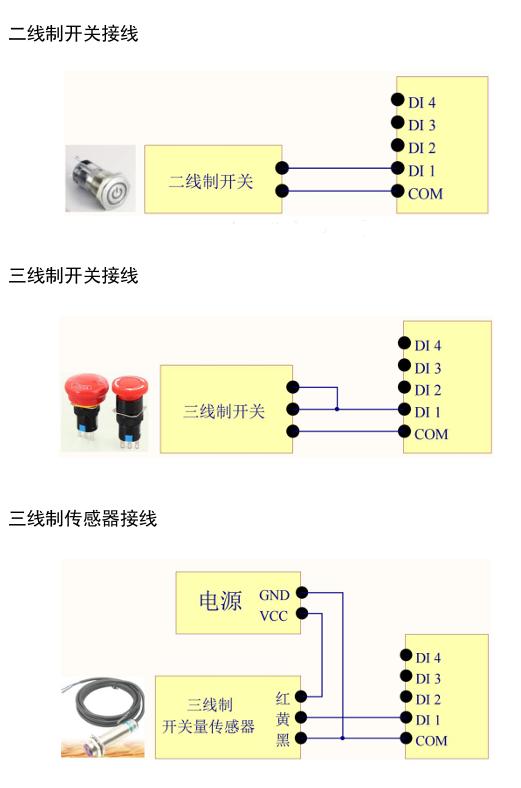
Output Wiring
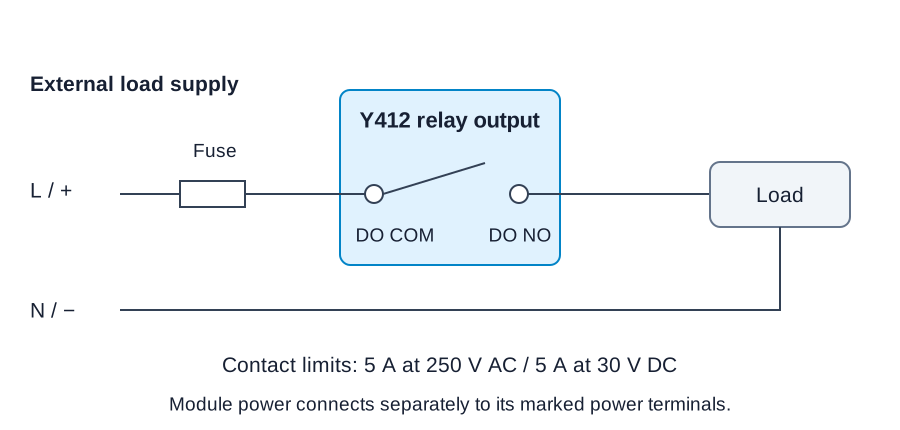
Relay contacts supply no voltage. Connect the external load supply and load in series through the selected DO COM and DO NO. The contact closes when the relay energizes.
Keep the load within both contact limits: 5 A at 250 V AC or 5 A at 30 V DC. Use a suitably rated external contactor for high-power or inductive loads, and fit overcurrent protection and surge suppression for the load.
Pairing and Configuration
DIP Switch Settings
Start with a two-device link before adding slaves. Match switches 1–5 across the group and set exactly one device as master.
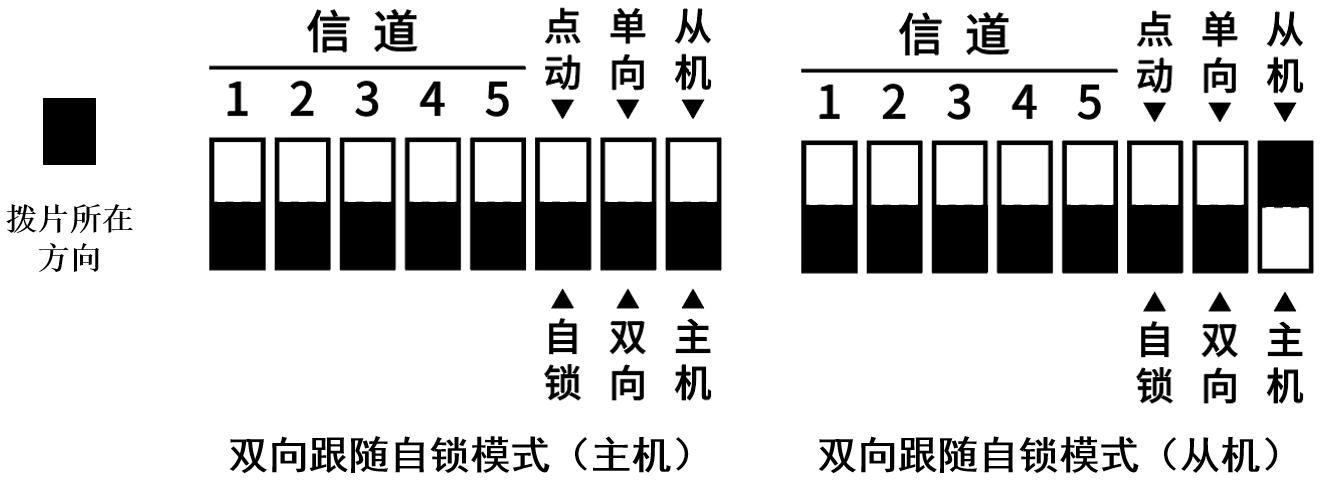
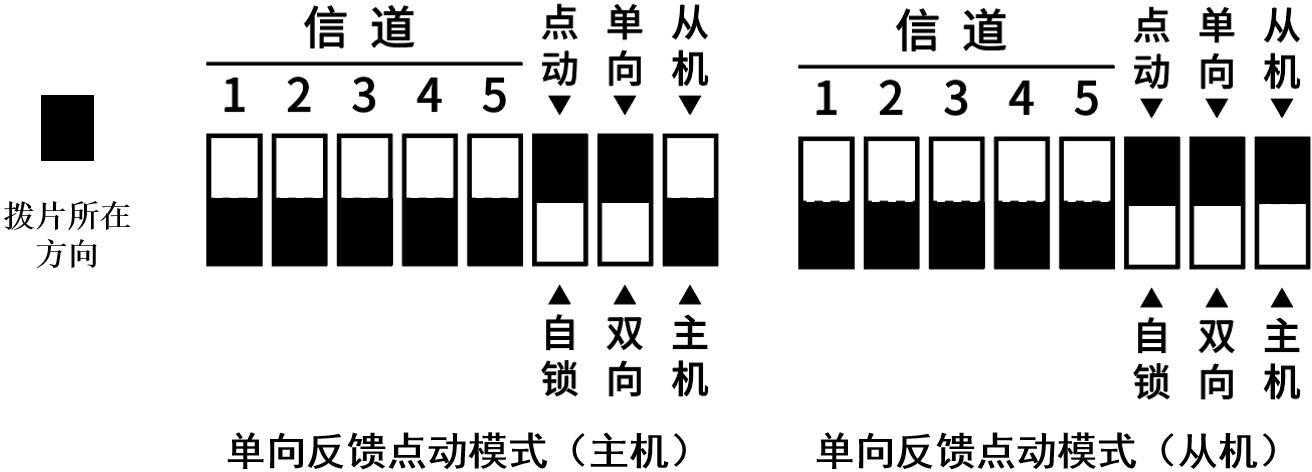
The supplied mode drawings use upper and lower slider positions. The black block marks the slider position; use the same orientation as the drawings and follow the labels on the actual device.
| Switch | Function | Upper position | Lower position |
|---|---|---|---|
| 6 | Output action | Momentary | Latching |
| 7 | Control direction | Unidirectional | Bidirectional |
| 8 | Device role | Slave | Master |
Mode Examples
For bidirectional latching control, set switches 6 and 7 to the lower position on both devices. Set switch 8 lower on the master and upper on the slave. Keep switches 1–5 identical.
For unidirectional momentary control, set switches 6 and 7 to the upper position on both devices. Set switch 8 lower on the master and upper on the slave. Keep switches 1–5 identical.
Advanced Configuration
Use the RS485 A/B/G interface and a compatible serial configuration tool for air-data mode, timeout reset, and other host-side parameters. Obtain the tool and instructions for the supplied version from YenGear before changing these settings.
Commissioning
LED Indicators
| LED | Indication |
|---|---|
| POWER | Module power |
| OUT | Corresponding relay output state |
| TXD / RXD | Wireless transmit/receive activity |
| RSSI1–RSSI3 | Signal-strength indication; a lit RSSI LED indicates a link |
| MODE | Mode or encryption status |
Functional Checks
- With loads isolated, check supply type, wiring, antenna connection, channel pattern, control mode, and the single-master assignment.
- Apply power. Check POWER and RSSI indications.
- Press a local key and check the corresponding remote OUT indicator. Verify the actual relay contact action as well as the LED.
- Test each channel, including press, hold, and release behavior. For latching mode, confirm that a second press resets the output.
- Test the reverse direction when bidirectional mode is selected, or the return feedback when unidirectional mode is selected.
- Repeat at the final locations. Test wireless loss and power recovery with loads isolated, then connect and test one load at a time.
Troubleshooting
| Symptom | Checks |
|---|---|
| No wireless link | Check module power, antennas, identical DIP 1–5 patterns, and exactly one master |
| Input changes but output does not switch | Check channel mapping, DIP 6/7 mode settings, and DI/COM wiring |
| OUT changes but the load does not operate | Check DO COM/DO NO, external load power, protection devices, and load rating |
| Intermittent communication | Check antenna height, metal obstructions, interference, and power; review the air-data mode with the compatible configuration tool |
| Output behavior changes after link or power loss | Keep loads isolated and check the configured timeout reset and recovery behavior |
Safety Notes
- Disconnect module and load power before changing wiring.
- Use the supply version and ratings printed on the unit; do not interchange AC and DC connections.
- Do not use the wireless link or local keys as the sole emergency-stop or personnel-safety path.
- Verify relay loading, protective earth, and enclosure suitability before operating equipment.
- Manufacturer: Hunan YenGear Tech Co., Ltd.
- Email: [email protected]
- Website: www.yengear.com