
Appearance
LoRaWAN Products
These products connect LoRaWAN field devices, serial equipment, and distributed I/O to industrial and building networks. The range includes indoor gateways, a serial DTU, and a field I/O RTU.
Model Naming
For LoRaWAN variants, the -L suffix identifies the radio option. Gateway channel capacity is selected separately as an 8-channel or 16-channel configuration. The four digits in Y503-2220-L represent DI / DO / AI / AO channel counts: 2 / 2 / 2 / 0.
| Model | Product role | Model interpretation |
|---|---|---|
Y501-L | Indoor LoRaWAN gateway | Y501 gateway family; 8-channel or 16-channel radio configuration |
Y511-L | Edge LoRaWAN gateway | Y511 gateway family; 8-channel or 16-channel radio configuration |
Y502-L | LoRaWAN serial DTU | RS485 and RS232 serial access to LoRaWAN |
Y503-2220-L | LoRaWAN RTU | 2 DI, 2 voltage DO, and 2 analog inputs (1 AV + 1 AI); no AO |
At a Glance
| Product Image | Model | Product type | Interfaces or I/O | Radio or device class | 4G | Documents |
|---|---|---|---|---|---|---|
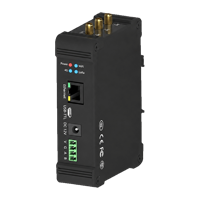 | Y501-L | Indoor LoRaWAN gateway | Ethernet, Wi-Fi, RS485 | 8 or 16 channels | Optional | Specification User Manual |
| Y511-L | Edge LoRaWAN gateway | Ethernet, Wi-Fi, RS485 | 8 or 16 channels | Optional | Specification User Manual |
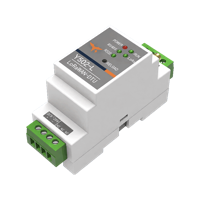 | Y502-L | LoRaWAN serial DTU | Isolated RS485, isolated RS232 | Class A / Class C | — | Specification User Manual |
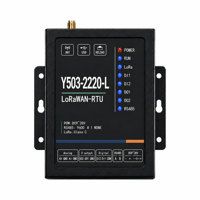 | Y503-2220-L | LoRaWAN RTU | Isolated RS485, 2 DI, 2 DO, 2 AI | Class A / Class C | — | Specification User Manual |
Gateway Series
Y501-L and Y511-L provide the gateway side of a LoRaWAN deployment. Both models include Ethernet, Wi-Fi, and RS485 as standard interfaces, with optional 4G backhaul. Select the gateway according to the required network service and edge-processing functions.
| Selection point | Y501-L | Y511-L |
|---|---|---|
| Basic role | Indoor LoRaWAN gateway and packet forwarder | Indoor LoRaWAN gateway with edge-side processing and application integration |
| LoRaWAN service | Remote Network Server packet forwarding; local NS/AS according to the ordered software configuration | Remote Network Server packet forwarding or local NS/AS according to the ordered software configuration |
| Backhaul | Ethernet and Wi-Fi standard; optional 4G | Ethernet and Wi-Fi standard; optional 4G |
| Field interface | RS485 hardware; local-service Modbus access depends on software | RS485 Modbus RTU server and Modbus TCP register mapping on compatible software |
| Application integration | Gateway packet forwarding; local data services where ordered | Local NS/AS application routes, JavaScript processing, and Modbus register mapping where ordered |
| Recommended when | The site needs a clear gateway-to-Network-Server path | The site needs local service ownership, application integration, or edge-side data processing |
LoRaWAN End Device Series
Y502-L and Y503-2220-L operate as field-side LoRaWAN end devices. Use Y502-L to connect serial equipment. Use Y503-2220-L to collect digital and analog signals and control digital outputs.
| Selection point | Y502-L | Y503-2220-L |
|---|---|---|
| Basic role | Serial DTU for PLCs, meters, data loggers, and serial sensors | Industrial RTU for distributed signal acquisition and remote control |
| Field interfaces | 1 isolated RS485 + 1 isolated RS232 | 1 isolated RS485; 2 DI, 2 DO, and 2 AI |
| Serial data | Modbus RTU or custom frames; ASCII/HEX command entry | Polling and transparent serial transport; confirm commands and payload mapping |
| Analog input | None | 1 fixed 0–10 V input (AV) + 1 fixed 4–20 mA input (AI) |
| Digital output | None | 2 switched voltage outputs; on-state voltage follows the RTU supply |
| Analog output | None | None |
| Recommended when | Existing serial devices need LoRaWAN access | The application needs 2 DI, 2 DO, and 2 AI at a remote point |
Channel Configurations
| Model | 8-channel configuration | 16-channel configuration |
|---|---|---|
| Y501-L | 8 RX / 1 TX | 16 RX / 2 TX |
| Y511-L | 8 RX / 1 TX | 16 RX / 2 TX |
The channel count describes concurrent radio reception. It does not define the maximum number of end devices. Practical capacity varies with airtime, spreading factor, payload size, reporting interval, downlink traffic, interference, and site conditions.
Frequency Plans
Select the regional hardware variant for every device in the system. The gateway's available plans do not establish the plans supported by the DTU or RTU.
| Regional plan | Y501-L / Y511-L | Y502-L | Y503-2220-L |
|---|---|---|---|
CN470 | Default | Reference plan | Reference plan |
EU433 | Available | Available | Available |
EU868 | Available | Available | Available |
AU915 | Available | Available | Available |
AS923 | Specify sub-plan | Specify sub-plan | Specify sub-plan |
US915 | Available | Available | Available |
IN865 | Available | Available | — |
RU864 | Available | Available | — |
“—” means the plan is outside the current YenGear model definition. Match the selected plan, channel group, and downlink settings across the gateway, Network Server, and end devices. Confirm the exact hardware and firmware variant before ordering.
Network and Control Path
Serial equipment / field signals → Y502-L / Y503-2220-L → LoRaWAN gateway → Network Server → Application
Y501-L and Y511-L provide the radio gateway. A remote Network Server, or the ordered local NS/AS software, manages device activation and sessions. The application decodes data and creates commands. Application MQTT connectivity alone does not replace the Network Server.
Class A devices receive downlinks after an uplink; Class C devices listen more often while powered. Neither class guarantees a fixed control response time. Choose reporting intervals and command timeouts after testing the complete path. The LoRaWAN end devices require the gateway/server path; they are not a factory-paired point-to-point cable replacement.
Quick Selection Guide
- Choose Y501-L for standard indoor gateway packet forwarding with a remote or configured local Network Server.
- Choose Y511-L when the gateway must process data locally or connect directly to application and industrial systems.
- Choose Y502-L when existing PLCs, meters, data loggers, or serial sensors need LoRaWAN access.
- Choose Y503-2220-L when the remote point needs 2 DI, 2 voltage DO, one 0–10 V input, and one 4–20 mA input. This model has no AO.
- Select the 8-channel or 16-channel gateway configuration and the regional frequency plan before ordering.
Documents
| Model | Specification | User Manual |
|---|---|---|
| Y501-L | Specification | User Manual |
| Y511-L | Specification | User Manual |
| Y502-L | Specification | User Manual |
| Y503-2220-L | Specification | User Manual |
For product-family navigation, see the Product Documentation Overview.
YenGear
Hunan YenGear Tech Co., Ltd.
Room 21014, Building 1, Fudi Xingguang Tiandi, Yingxin Road, Yuhua District, Changsha, Hunan, China
[email protected] · www.yengear.com